New_category: News

News

  • Piezo vs Capacitive Switches: What’s the Difference?

    Piezo vs Capacitive Switches: What’s the Difference?

    [vc_row][vc_column][vc_column_text]

    Piezo vs Capacitive Switches: What’s the Difference?

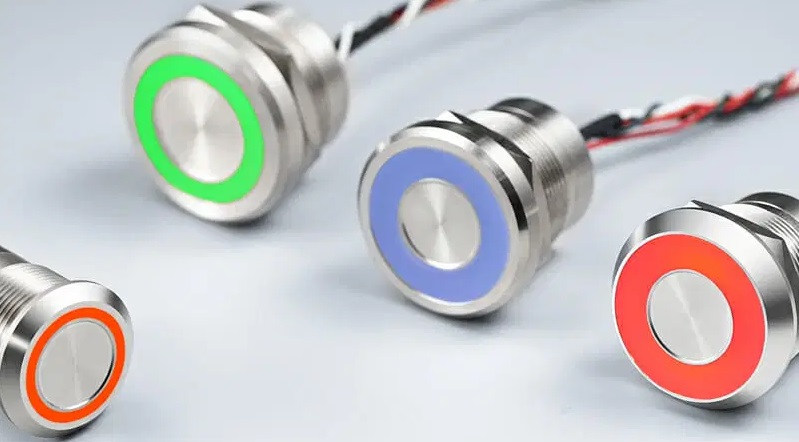
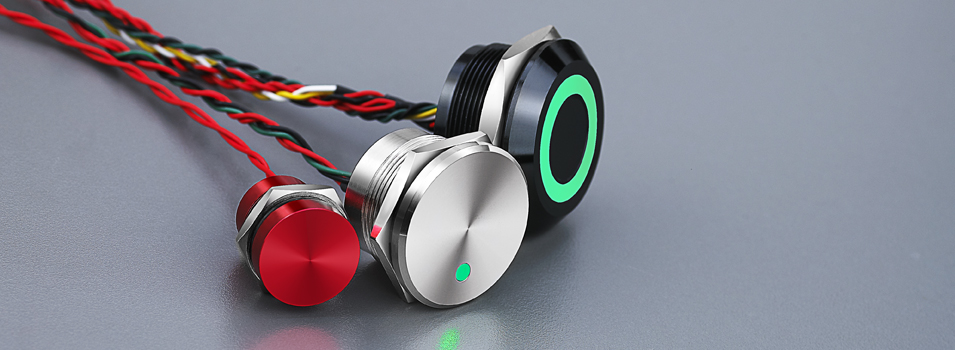
    [/vc_column_text][vc_single_image image=”8669″ img_size=”1200×350″ alignment=”center”][vc_column_text]Switches are found in nearly all electronic devices. While some of them are mechanical, though, others are touch-based. Two of the most common types of touch-based switches include piezo and capacitive. They don’t feature moving parts like their mechanical counterparts. Like all touch-based switches, piezo and capacitive switches will open or close a circuit in response to physical contact with a finger or object.[/vc_column_text][vc_column_text]

    What Is a Piezo Switch?

    [/vc_column_text][vc_column_text]A Piezo switch is a type of switch that leverages the properties of a piezoelectric material to change the orientation of a circuit. Piezoelectric materials are those that store an electrical charge when exposed to pressure. When certain materials are exposed to pressure, such as the pressure of a finger, they will store an electrical charge. These materials are known as piezoelectric materials, and they are used in the construction of piezo switches as well as piezo touchscreens.[/vc_column_text][vc_column_text]

    What Is a Capacitive Switch?

    [/vc_column_text][vc_column_text]A Capacitive switch, on the other hand, is a type of switch that leverages capacitive technology to change the orientation of a circuit. Capacitive technology refers to the use of a uniform electrostatic field to detect touches. Capacitive switches will create a uniform electrostatic field while simultaneously measuring it for changes. If you touch a key on a capacitive switch with a bare finger or any conductive object, the electrostatic field will change. The capacitive switch will then respond by opening or closing the circuit.[/vc_column_text][vc_column_text]

    Differences Between Piezo and Capacitive Switches

    [/vc_column_text][vc_column_text]Piezo and capacitive are both touch-based switches. They are designed to open or close a circuit. The way in which they operate, though, varies. Piezo switches are made of a piezoelectric material. When you press a key on a piezoelectric switch, it will store an electric charge while opening or closing the circuit.

    Capacitive switches aren’t made of a piezoelectric material. You can find them in different materials. Some of them are made of glass, whereas others are made of a transparent polymer. Regardless, capacitive switches don’t contain any piezoelectric materials in their construction. They are made of traditional materials, such as glass or plastic, that feature conductive traces.

    When turned on, capacitive switches will emit a uniform electrostatic field. They’ll constantly measure this electrostatic field to determine when to open or close the circuit. Pressing a key with a bare finger will absorb some of the electrostatic field’s charge. As a result, the capacitive switch will respond by opening or closing the circuit.[/vc_column_text][vc_zigzag]

    Get Custom Quote
    We’ll get back to you within 12 hours.
    Drag & Drop Files, Choose Files to Upload You can upload up to 3 files.
    [/vc_column][/vc_row][vc_row][vc_column][vc_zigzag][/vc_column][/vc_row]

  • Improve the dual control program on Energy Consumption Intensity & Total Energy Consumption

    Improve the dual control program on Energy Consumption Intensity & Total Energy Consumption

    [vc_row][vc_column width=”2/3″][vc_column_text]

    Improve the dual control scheme of Energy Consumption Intensity & Total Energy Consumption

    [/vc_column_text][vc_single_image image=”8812″ img_size=”700×300″ alignment=”center”][vc_column_text]Dear Customer,

    Perhaps you have noticed that the recent “dual control of energy consumption” policy of the Chinese government, which has a certain impact on the production capacity of some manufacturing companies, and the delivery of orders in some industries has to be delayed.

    In addition, the China Ministry of Ecology and Environment has issued the draft of “2021-2022 Autumn and Winter Action Plan for Air Pollution Management” in September. During the autumn and winter this year (from 1st Oct, 2021 to 31st March, 2022), the production capacity in some industries may be further restricted.

    To mitigate the impacts of these restrictions, we recommend that you place the order as soon as possible. We will arrange production in advance to ensure that your order could be delivered on time.

    Yours sincerely,
    Langir Electric[/vc_column_text][vc_separator][vc_column_text]

    完善能源消费强度和总量双控制度方案

    [/vc_column_text][vc_column_text]尊敬的客户,

    也许您已经注意到近期的“能耗双控”对部分制造企业的产能造成了一定的影响,部分行业的订单交期不得不延迟。

    此外,中国生态环境部办公厅已于9月发布了《重点区域2021-2022年秋冬季大气污染综合治理攻坚方案(征求意见稿)》,今年秋冬季节,部分行业将被重点关注,产能或将被进一步限制。

    为减少这一限制政策的影响,我们建议您尽早下订单,这样我们可以提前安排产线,确保您的订单能够如期交货。

    祝好
    朗齐尔电器[/vc_column_text][/vc_column][vc_column width=”1/3″]

    Get Custom Quote
    We’ll get back to you within 12 hours.
    Drag & Drop Files, Choose Files to Upload You can upload up to 3 files.
    [/vc_column][/vc_row][vc_row][vc_column][vc_zigzag][/vc_column][/vc_row]

  • Pros and Cons of Resistive Touch Switches

    Pros and Cons of Resistive Touch Switches

    [vc_row][vc_column][vc_column_text]

    Pros and Cons of Resistive Touch Switches

    [/vc_column_text][vc_row_inner][vc_column_inner][vc_single_image image=”8739″ img_size=”full” alignment=”center”][vc_column_text]Have you heard of resistive touch switches? While not as popular as capacitive or piezo touch switches, they are still used in many devices. Resistive touch switches use a similar method of operation as resistive touchscreens. They contain two layers, each of which features electrodes, that are separated by air. When you press a button, the top layer will push into the button so that the electrodes may contact. This contact will complete the circuit so that the resistive touch switch registers your command.[/vc_column_text][/vc_column_inner][/vc_row_inner][vc_column_text]

    Pro: Inexpensive

    [/vc_column_text][vc_column_text]Resistive touch switches are inexpensive. They feature a simpler design that other types of touch switches. Capacitive touch switches, for instance, have a complex design that projects an electrical charge across the button. Touching the button will draw some of this electrical charge to your finger, which the capacitive switch will detect as a command. There is no electrical charge with resistive touch switches. Rather, they feature a simple design consisting of two layers of electrodes.

    [/vc_column_text][vc_column_text]

    Pro: Supports All Touches

    [/vc_column_text][vc_column_text]Resistive touch switches also support all types of touches. The same can’t be said for capacitive touch switches. Capacitive touch switches only support touches performed with a conductive object. You can use a bare finger to operate them. The human body has conductive properties. As long as you aren’t wearing gloves, you can control a capacitive touch switch with a finger. Resistive touch switches, though, support all types of touches. You can control them with a bare finger, a gloved finger, a stylus or any other object, regardless of whether the object is electrically conductive or resistive.

    [/vc_column_text][vc_column_text]

    Con: Requires More Force

    [/vc_column_text][vc_column_text]On the other hand, resistive touch switches require more force than other types of touch switches. Without adequate force, they won’t register your commands. Resistive touch switches require force because of their use of layers. They feature two layers that are separated by air. The layers, of course, features electrodes on them. If you don’t press the button with enough force, the resistive touch switch’s layers won’t make contact with each other. In turn, the resistive touch switch won’t register your command.

    [/vc_column_text][vc_column_text]

    Con: Shorter Lifespan

    [/vc_column_text][vc_column_text]It’s also worth noting that resistive touch switches tend to have a shorter lifespan. This is due to the fact that they contain moving parts. Resistive is still a type of touch switch technology, but unlike other touch switch technologies, it contains moving parts. The two electrode-patterned layers, for instance, will move in response to your commands. As these layers constantly move, they may wear down.[/vc_column_text][vc_zigzag]

    Get Custom Quote
    We’ll get back to you within 12 hours.
    Drag & Drop Files, Choose Files to Upload You can upload up to 3 files.
    [/vc_column][/vc_row][vc_row][vc_column][vc_zigzag][/vc_column][/vc_row]

  • Capacitance vs Resistive vs Piezo Touch Switches

    Capacitance vs Resistive vs Piezo Touch Switches

    [vc_row][vc_column][vc_column_text]

    Capacitance vs Resistive vs Piezo Touch Switches

    [/vc_column_text][vc_row_inner][vc_column_inner][vc_single_image image=”8739″ img_size=”full” alignment=”center”][/vc_column_inner][/vc_row_inner][vc_column_text]Touch switches are found in everything from smartphones and tablets to lamps and machines. The term “touch switch” refers to any type of electrical switch that requires touch to operate. Most touchscreen interfaces feature multiple touches switched embedded within the display. While all touch switches serve the same basic function, there are some subtle nuances between the different types. The three primary types of touch switches include resistive, capacitance and piezo.[/vc_column_text][vc_column_text]

    Capacitance

    [/vc_column_text][vc_column_text]A capacitance touch switch is unique in the sense that it requires just a single electrode to function. This electrode can be installed behind a non-conductive panel, including materials like wood, glass or plastic. It works by using body capacitance, meaning it detects the electrical charge produced by the human operator. Upon touching the interface, this electrical charge increases the capacitance and engages the touch switch.[/vc_column_text][vc_column_text]

    Resistive

    [/vc_column_text][vc_column_text]A resistance touch switch requires not one but two separate electrodes to function — and these electrodes must be in contact with something conductive, such as a finger. Resistive touch switches work by lowering the resistance between two pieces of metal. When you place your finger across the plane, it turns on the switch. Consequently, removing your finger from the plate disengages the switch by turning it off.

    A key benefit associated with resistive touch switches is the ability to operate it with a bare finger or gloves finger. This is in stark contrast to capacitance touch switches, which require the use of a bare finger. Some people prefer resistive touch switches over their capacitance counterpart for this very reason.[/vc_column_text][vc_column_text]

    Piezo

    [/vc_column_text][vc_column_text]A third type of touch switch is the piezo. Piezo touch switches receive their namesake from the piezo ceramic properties, which allow for bending. They are constructed behind a surface, allowing the switch to be integrated with nearly any kind of material. It’s also worth noting that piezo switches can work as an actuator.[/vc_column_text][vc_column_text]So, which type of touch switch should you choose? There’s really no easy answer to this question, as it varies depending on your unique needs and how the switch will be used. Many people prefer capacitive touch switches because of their high accuracy and quality. However, resistive touch switches are a viable option to consider as well.[/vc_column_text][vc_zigzag]

    Get Custom Quote
    We’ll get back to you within 12 hours.
    Drag & Drop Files, Choose Files to Upload You can upload up to 3 files.
    [/vc_column][/vc_row][vc_row][vc_column][vc_zigzag][/vc_column][/vc_row]

  • What’s the Best Backlighting for a Capacitive Switch?

    What’s the Best Backlighting for a Capacitive Switch?

    [vc_row][vc_column][vc_column_text]

    What’s the Best Backlighting for a Capacitive Switch?

    [/vc_column_text][vc_row_inner][vc_column_inner][vc_single_image image=”8707″ img_size=”1200×300″ alignment=”center”][/vc_column_inner][/vc_row_inner][vc_column_text]Backlighting is commonly found in capacitive switches. It consists of lighting system that’s able to illuminate the keys or button legends from underneath. If you’re planning to use a capacitive switch in a dark environment — or any environment with poor lighting — you should consider choosing a capacitive switch with backlighting. There are different types of backlighting, however, some of which work better for capacitive switches than others. What’s the best backlighting for a capacitive switch exactly?[/vc_column_text][vc_column_text]

    How Capacitive Switches Work

    [/vc_column_text][vc_column_text]To determine the best type of backlighting for capacitive switches, you should familiarize yourself with the mechanics of capacitive switches. Capacitive switches are designed to control a circuit. All switches, in fact, serve this same purpose. Capacitive switches are different in the sense that they only require contact with a conductive object to change the orientation of the circuit. Exposure to a conductive object, such as your bare finger, will engage the capacitive switch’s circuit. It will either open or close the circuit.

    Since they only require contact with a conductive object to open or close the circuit, capacitive switches are often designed with backlighting. They can be designed with backlighting underneath the overlay layer, which doesn’t interfere with their operations.

    [/vc_column_text][vc_column_text]

    LED Backlighting

    [/vc_column_text][vc_column_text]While capacitive switches support many types of backlighting, light-emitting diode (LED) has become the most common. More capacitive switches feature LED backlighting than any other type of backlighting. LED backlighting uses similar bulbs as LED fixtures. They are just smaller and more compact LED bulbs. With LED backlighting, capacitive switches will feature an illuminated overlay layer that makes them easier to see and use.

    Some of the benefits of LED backlighting for capacitive switches include the following:

    • Allows capacitive switches to be used in dark environments with little or no light
    • Energy-efficient lighting technology
    • Produces less heat than other types of backlighting

    [/vc_column_text][vc_column_text]

    Light Guides

    [/vc_column_text][vc_column_text]You can choose LED backlighting for capacitive switches either with or without light guides. What are light guides, and how do they work in backlighting systems? Light guides are components that propagate and distribute light. They essentially “guide” the light to the areas where it’s needed.

    With light guides, the light produced by a capacitive switch’s backlighting system will be evenly distributed. The capacitive switch won’t suffer from dark or bright spots. Rather, its overlay layer will receive an equal amount of light throughout. If you’re looking to buy a capacitive switch, you may want to choose LED backlighting with light guides for this reason.[/vc_column_text][vc_zigzag]

    Get Custom Quote
    We’ll get back to you within 12 hours.
    Drag & Drop Files, Choose Files to Upload You can upload up to 3 files.
    [/vc_column][/vc_row][vc_row][vc_column][vc_zigzag][/vc_column][/vc_row]

  • 5 Facts About Touch Switches

    5 Facts About Touch Switches

    [vc_row][vc_column][vc_single_image image=”7771″ img_size=”1200×350″ alignment=”center”][vc_column_text]

    5 Facts About Touch Switches

    [/vc_column_text][vc_column_text]Electrical switches play an integral role in the function of countless electronic devices. From computers and smartphones to lamps, appliance, remote controls and more, many electronic devices feature one or more electrical switches. They are designed to open and close the circuit, thereby controlling the respective device.

    Touch switches, however, are distinguished from traditional mechanical switches by their method of operation. Rather than using a mechanical operation to open and close the circuit, they use a touch-based method of operation.[/vc_column_text][vc_column_text]

    1) Long-Lasting Functionality

    [/vc_column_text][vc_column_text]Touch switches are capable of lasting a very long time. Since they don’t use a mechanical method of operation, they are naturally exposed to less stress than mechanical switches. As a result, touch switches can withstand the hands of time for many years. If you’re tired of constantly replacing your mechanical switches, you may want to choose a touch switch for this reason.[/vc_column_text][vc_column_text]

    2) One Electrode

    [/vc_column_text][vc_column_text]Capacitive touch switches — the most common type — only require a single electrode to function. The electrode is typically embedded behind a layer of glass or plastic. When you press a capacitive touch switch, your finger will increase the switch’s capacitance through the electrode. The capacitive touch switch will then recognize this change in capacitance as a command to open or close the circuit.[/vc_column_text][vc_row_inner][vc_column_inner width=”1/3″][vc_single_image image=”10027″ img_size=”large” alignment=”center”][vc_column_text css=””]

    16mm Capacitive switch

    [/vc_column_text][/vc_column_inner][vc_column_inner width=”1/3″][vc_single_image image=”10030″ img_size=”large” alignment=”center”][vc_column_text css=””]

    22mm Capacitive switch

    [/vc_column_text][/vc_column_inner][vc_column_inner width=”1/3″][vc_single_image image=”10029″ img_size=”large” alignment=”center”][vc_column_text css=””]

    25mm Capacitive switch

    [/vc_column_text][/vc_column_inner][/vc_row_inner][vc_column_text]

    3) Some Touch Switches Work With Gloves

    [/vc_column_text][vc_column_text css=””]While you can’t control a capacitive touch switch while wearing gloves, you can control a resistive touch switches with a gloved finger. Like resistive touchscreens, resistive switches contain multiple layers with conductive traces that are separated by a spacer layer of air. When you press a resistive touch switch, the two conductive traces will meet, thereby opening the circuit. Releasing your finger from a resistive touch switch, on the other hand, breaks the circuit.[/vc_column_text][vc_column_text]

    4) Some Touch Switches Use Piezo Technology

    [/vc_column_text][vc_column_text css=””]A lesser-known type of touch switch technology is piezo. Piezo touch switches work by relying on piezo mechanics to determine when the circuit should be open and when it should be closed. Piezo touch switches aren’t as common as capacitive or resistive touch switches, but they are gaining momentum thanks in part to their high level of durability.[/vc_column_text][vc_row_inner][vc_column_inner width=”1/3″][vc_single_image image=”9949″ img_size=”large” alignment=”center”][vc_column_text css=””]

    16mm Piezo switch

    [/vc_column_text][/vc_column_inner][vc_column_inner width=”1/3″][vc_single_image image=”9972″ img_size=”large” alignment=”center”][vc_column_text css=””]

    22mm Piezo switch

    [/vc_column_text][/vc_column_inner][vc_column_inner width=”1/3″][vc_single_image image=”9976″ img_size=”large” alignment=”center”][vc_column_text css=””]

    25mm Piezo switch

    [/vc_column_text][/vc_column_inner][/vc_row_inner][vc_column_text]

    5) They Act as a Tactile Sensor

    [/vc_column_text][vc_column_text css=””]Whether it’s capacitive, resistive or piezo, all touch switches act as a tactile sensor. In other words, they respond specifically to your touch commands. They don’t necessarily produce tactile feedback, but touch sensors still require physical contact to function as intended. Therefore, they are considered a type of tactile sensor.[/vc_column_text][vc_zigzag]

    Get Custom Quote
    We’ll get back to you within 12 hours.
    Drag & Drop Files, Choose Files to Upload You can upload up to 3 files.
    [/vc_column][/vc_row][vc_row][vc_column][vc_zigzag][/vc_column][/vc_row]

  • Capacitive Switches: 5 Things You Need to Know

    Capacitive Switches: 5 Things You Need to Know

    [vc_row][vc_column][vc_column_text]

    Capacitive Switches: 5 Things You Need to Know

    [/vc_column_text][vc_single_image image=”7771″ img_size=”1200X350″ alignment=”center”][vc_column_text]Not all switches use a mechanical method of operation. Some of them use electricity to determine when to open or close a circuit. Known as capacitive switches, they are commonly used in touchpads, proximity sensors and other switch-related applications. Below are five important things you need to know about capacitive switches.[/vc_column_text][vc_column_text]

    1) Features 3 Sections

    [/vc_column_text][vc_column_text]While available in different designs, most capacitive switches feature three sections. They have a graphic overlay on top, followed by a circuit layer and then a back layer. The graphic overlay, of course, is the layer featuring the icons or graphics for the switch’s buttons. The circuit layer, on the other hand, is the layer featuring the switch’s electrical circuit or circuits. Underneath the graphic overlay and circuit layers is the back layer, which is the final section.[/vc_column_text][vc_row_inner][vc_column_inner width=”1/3″][vc_single_image image=”10030″ img_size=”large” alignment=”center”][vc_column_text]

    22mm Capacitive switch

    [/vc_column_text][/vc_column_inner][vc_column_inner width=”1/3″][vc_single_image image=”10027″ img_size=”large” alignment=”center”][vc_column_text]

    16mm Capacitive switch

    [/vc_column_text][/vc_column_inner][vc_column_inner width=”1/3″][vc_single_image image=”10029″ img_size=”large” alignment=”center”][vc_column_text]

    25mm Capacitive switch

    [/vc_column_text][/vc_column_inner][/vc_row_inner][vc_column_text]

    2) Glass or Plastic

    [/vc_column_text][vc_column_text]The overlay layer used in capacitive switches is typically made of either glass or plastic (or sometimes acrylic). They are both durable and transparent materials, making them ideal for capacitive switches. Glass, however, offers a higher level of clarity than plastic. Plastic, on the other hand, is better suited for heavy use. You can find capacitive switches with either a glass or plastic overlay layer.[/vc_column_text][vc_column_text]

    3) Long-Lasting

    [/vc_column_text][vc_column_text]Capacitive switches are long-lasting. Most capacitive switches, in fact, last longer than their mechanical counterparts. This is because they don’t have moving parts. Mechanical switches are defined by their use of separate, moving parts. When you use a mechanical switch, the parts from which it’s made will move. There is no movement with capacitive switches. Capacitive switches use a similar method of operation as capacitive touchscreens, thereby eliminating the need for moving parts.[/vc_column_text][vc_column_text]

    4) Requires Conductive Contact

    [/vc_column_text][vc_column_text]If you’re planning to use a capacitive switch, you should know that they require contact with a conductive object to work. You can’t control a capacitive switch with a nonconductive object. All capacitive switches require the use of a conductive object. Your body is conductive. Therefore, you can control a capacitive switch with your bare finger. If you’re wearing gloves, though, the capacitive switch may not respond to your command.[/vc_column_text][vc_column_text]

    5) Supports Backlighting

    [/vc_column_text][vc_column_text]Capacitive switches support backlighting. Backlighting is a component that, as the name suggests, is used to light up a switch’s overlay layer. It’s embedded behind the overlay layer where it illuminates the legends. The most popular backlighting solutions for capacitive switches include electroluminescent (EL) and light-emitting diode (LED).[/vc_column_text][/vc_column][vc_column][vc_zigzag]

    Get Custom Quote
    We’ll get back to you within 12 hours.
    Drag & Drop Files, Choose Files to Upload You can upload up to 3 files.
    [/vc_column][/vc_row][vc_row][vc_column][vc_zigzag][/vc_column][/vc_row]

  • An Introduction to Capacitive Switch: What You Should Know

    An Introduction to Capacitive Switch: What You Should Know

    [vc_row][vc_column][vc_single_image image=”7771″ img_size=”1200×350″ alignment=”center”][vc_column_text]

    An Introduction to Capacitive Switch: What You Should Know

    [/vc_column_text][vc_column_text]When researching some of the different types of electrical switches, you may come across capacitive switches. They’ve become an increasingly popular alternative to mechanical switches. You can find capacitive switches for consumer electronics as well as commercial electronics. Like all switches, they are designed to control a circuit. capacitive switches, however, feature a unique design that sets them apart from the rest.[/vc_column_text][vc_column_text]

    Overview of Capacitive Switches

    [/vc_column_text][vc_column_text]Capacitive switches are circuit-controlling devices that are characterized by their touch-based method of operation. They are similar to capacitive touchscreens. Capacitive touchscreens and capacitive switches both require direct contact with a conductive object, such as a bare finger. Contact with a conductive object will create a disruption in an otherwise uniform electrostatic field.

    There are different types of Capacitive switches. Nonetheless, they all require direct contact with a conductive object. You can’t control a capacitive switch with a non-conductive object. All Capacitive switches operate by measuring capacitance. They’ll emit an electrostatic field while simultaneously measuring it for changes of capacitance.[/vc_column_text][vc_row_inner][vc_column_inner width=”1/3″][vc_single_image image=”10028″ img_size=”large” alignment=”center”][vc_column_text]

    19mm Capacitive switch

    [/vc_column_text][/vc_column_inner][vc_column_inner width=”1/3″][vc_single_image image=”10030″ img_size=”large” alignment=”center”][vc_column_text]

    22mm Capacitive switch

    [/vc_column_text][/vc_column_inner][vc_column_inner width=”1/3″][vc_single_image image=”10029″ img_size=”large” alignment=”center”][vc_column_text]

    25mm Capacitive switch

    [/vc_column_text][/vc_column_inner][/vc_row_inner][vc_column_text]

    Benefits of Capacitive Switches

    [/vc_column_text][vc_column_text]Being that there are other switches on the market, you might be wondering what benefits capacitive switches offer. Well, there are several reasons to consider choosing capacitive switches. For starters, they are better protected against mechanical failure. Mechanical failure, in fact, is almost nonexistent in capacitive switches. This is because capacitive switches don’t use moving parts to control a circuit; they use capacitance.

    Capacitive switches are also more ergonomic than traditional switches. You can control them naturally and effortlessly by pressing your finger against the capacitive panel. This makes them more ergonomic than traditional switches, which often require a more forceful touch.[/vc_column_text][vc_column_text]

    Choosing the Right Capacitive Switches

    [/vc_column_text][vc_column_text]If you’re thinking about capacitive switches for your business, you should choose the right type. You can find capacitive switches in different materials. The overlays, for instance, are often made of either plastic, glass or acrylic. All three of these materials are transparent. Plastic and acrylic, though, are typically stronger than glass. Glass, on the other hand, offers a higher level of clarity and brightness.

    In addition to the overlay material, you should consider the backlighting when choosing capacitive switches. While not a requirement for capacitive switches, many of them feature backlighting. Some of the most common types of backlighting for capacitive switches include light-emitting diode (LED), electroluminescent (EL) and light guides. Backlighting will illuminate a capacitive switch so that it’s easier to see and use in low-light conditions.[/vc_column_text][vc_zigzag]

    Get Custom Quote
    We’ll get back to you within 12 hours.
    Drag & Drop Files, Choose Files to Upload You can upload up to 3 files.
    [/vc_column][/vc_row][vc_row][vc_column][vc_zigzag][/vc_column][/vc_row]

  • Piezo Switches: An Introduction to These Touch Switches

    Piezo Switches: An Introduction to These Touch Switches

    [vc_row][vc_column][vc_single_image image=”8669″ img_size=”1200×350″ alignment=”center”][vc_column_text]

    Piezo Switches: An Introduction to These Touch Switches

    [/vc_column_text][vc_column_text]Have you heard of piezo switches? They’ve become one of the most popular types of touch switches on the market. Like all touch switches, piezo switches don’t rely on moving parts to open and close their circuits. Rather, you can control them via touch. What are piezo switches exactly, and how do they work?[/vc_column_text][vc_row_inner][vc_column_inner width=”1/3″][vc_single_image image=”9973″ img_size=”large” alignment=”center”][vc_column_text css=””]

    22mm Piezo switch

    [/vc_column_text][/vc_column_inner][vc_column_inner width=”1/3″][vc_single_image image=”9957″ img_size=”large” alignment=”center”][vc_column_text css=””]

    16mm Piezo switch

    [/vc_column_text][/vc_column_inner][vc_column_inner width=”1/3″][vc_single_image image=”9960″ img_size=”large” alignment=”center”][vc_column_text css=””]

    19mm Piezo switch

    [/vc_column_text][/vc_column_inner][/vc_row_inner][vc_column_text]

    The Basics of Piezo Switch

    [/vc_column_text][vc_column_text]A piezo switch is a type of touch switch that relies on the piezoelectric effect to open and close its circuits. You can operate them by pressing your finger against a given key. When exposed to your finger, the piezo switch will generate a pulse of electricity that opens or closes the underlying circuit.[/vc_column_text][vc_column_text]

    How Piezo Switches Work

    [/vc_column_text][vc_column_text]Piezo switches work by using a piezoelectric element to generate electricity. Piezoelectric elements are materials that convert and store mechanical energy as electric energy. Touching a piezo switch will exposed it to mechanical stress. As you press your finger against a button, the piezoelectric element will take this mechanical energy and store it as electric energy. This electricity is then used to change the circuit’s orientation.[/vc_column_text][vc_column_text]

    Advantages of Piezo Switches

    [/vc_column_text][vc_column_text css=””]With their touch-based method of operation, piezo switches are durable. It’s not uncommon for piezo switches to last for millions or even tens of millions of key presses. Other types of switches tend to have a shorter lifespan. Mechanical switches, for instance, are exposed to wear and tear during each key press. Therefore, they are more likely to experience premature failure than their piezo switch counterparts.

    Another advantage of piezo switches is moisture protection. They can be used in wet and humid environments without succumbing to moisture damage. With piezo switches, the circuits are protected from moisture. Piezo switches feature a sealed design that prevents moisture from reaching their circuits. This makes them an attractive choice for wet and humid environments.

    You can easily clean piezo switches. All switches will inevitably gather dust and dirt. Thanks to their sealed design, however, you can clean a piezo switch with traditional cleaning products. Spraying a cleaning product onto a piezo switch won’t damage it. All piezo switches are sealed, so you can clean them without damaging them.

    There are different the faceplate materials available for piezo switches. Stainless steel is a popular choice. It’s sleek, strong and resistant to rust. Other faceplate materials for piezo switches include aluminum, glass and plastic, each of which offers its own benefits.[/vc_column_text][vc_zigzag]

    Get Custom Quote
    We’ll get back to you within 12 hours.
    Drag & Drop Files, Choose Files to Upload You can upload up to 3 files.
    [/vc_column][/vc_row][vc_row][vc_column][vc_zigzag][/vc_column][/vc_row]

  • How to Choose a Capacitive Switch?

    How to Choose a Capacitive Switch?

    [vc_row][vc_column][vc_single_image image=”7771″ img_size=”1200X350″ alignment=”center”][vc_column_text]

    How to Choose a Capacitive Switch?

    [/vc_column_text][vc_column_text]Are you looking to buy a Capacitive switches? If so, you’ll need to choose the right type. Capacitive switches have become increasingly popular. Like all touch switches, they operate via touch. Capacitive switches use a similar method of operation as capacitive touchscreens, with both devices leveraging the human body’s conductivity properties to open and close their respective switches.

    There are many different types of Capacitive switches, however. You can find them in different materials, button configurations, styles and more. Regardless of the application for which you plan on using it, it’s important to choose the right Capacitive switch.[/vc_column_text][vc_column_text]

    Panel Material

    [/vc_column_text][vc_column_text]Most capacitive switches have an overlay panel. Behind this overlay panel is the electrode, which is responsible for identifying touch commands. Touching a capacitive switch’s panel will result in a change of capacitance. The electrode behind the panel will transfer some of its electricity to your finger, thereby allowing the capacitive switch to identify your command. You can find capacitive switches, though, available in different panel materials.[/vc_column_text][vc_column_text]Some of the most common panel materials used for capacitive switches include the following:[/vc_column_text][vc_column_text]

    • Glass
    • Plastic
    • Acrylic

    [/vc_column_text][vc_column_text]

    FPC vs PCB

    [/vc_column_text][vc_column_text]When choosing a capacitive switch, one of the decisions you’ll have to make is whether to go with a Flexible Printed Circuit (FPC) or a Printed Circuit Board (PCB). All capacitive switches have a circuit board. The circuit board is the electrical component that contains the conductive pathways for a switch’s buttons. There are two types of circuit boards used in capacitive switches: FPCs and PCBs.

    FPCs are defined by their flexible composition. They are able to bend and flex without breaking. This flexible construction allows them to fit into small spaces. PCBs serve the same purpose as FPCs, but they have a stiff and rigid composition rather than a flexible composition.[/vc_column_text][vc_row_inner][vc_column_inner width=”1/3″][vc_single_image image=”10028″ img_size=”large” alignment=”center”][vc_column_text]

    19mm Capacitive switch

    [/vc_column_text][/vc_column_inner][vc_column_inner width=”1/3″][vc_single_image image=”10030″ img_size=”large” alignment=”center”][vc_column_text]

    22mm Capacitive switch

    [/vc_column_text][/vc_column_inner][vc_column_inner width=”1/3″][vc_single_image image=”10027″ img_size=”large” alignment=”center”][vc_column_text]

    16mm Capacitive switch

    [/vc_column_text][/vc_column_inner][/vc_row_inner][vc_column_text]

    Backlighting

    [/vc_column_text][vc_column_text]You may want to choose a capacitive switch with backlighting. Like many other types of touch switches, capacitive switches support backlighting. They can be laser-etched, for instance, so that light beams through select areas of the panel. Backlighting isn’t a requirement for capacitive switches. Nonetheless, many businesses prefer capacitive switches with backlighting because it makes them easier to use in low-light conditions.

    Light-emitting diode (LED) is the most common type of backlighting for capacitive switches. It’s energy efficient, produces little or no heat, long-lasting and effective. With that said, LED backlighting can be used with light guides to achieve a more even level of illumination that’s protected from bright and dark spots.[/vc_column_text][vc_zigzag]

    Get Custom Quote
    We’ll get back to you within 12 hours.
    Drag & Drop Files, Choose Files to Upload You can upload up to 3 files.
    [vc_zigzag][/vc_column][/vc_row]

  • How to Choose a Piezo Switch?

    How to Choose a Piezo Switch?

    [vc_row][vc_column][vc_single_image image=”8669″ img_size=”1200×400″ alignment=”center”][vc_column_text]

    How to Choose a Piezo Switch

    [/vc_column_text][vc_column_text]Are you looking to buy a piezo switch? If so, you’ll need to choose the right type. While all piezo switches use a piezoelectric element to control an underlying circuit, not all of them are the same. They are available in different materials, technologies, features, design specifications and more. By following these tips, however, you can choose the right piezo switch for your business’s needs.[/vc_column_text][vc_column_text]

    Material

    [/vc_column_text][vc_column_text]You should consider the faceplate material when choosing a piezo switch. Most piezo switches are designed with a faceplate. The material used for the faceplate, though, may vary. There are stainless steel faceplates as well as aluminum and plastic faceplates. Alternatively, you can choose a piezo switch with a glass faceplate. Each faceplate material has its own pros and cons. Therefore, you should evaluate your applications to determine which faceplate material is best.[/vc_column_text][vc_separator][vc_column_text css=””]Don’t forget to consider the back panel material when choosing a Piezo switch. All Piezo switches have a back panel. Like with the faceplate, though, the material from which the back panel is made can vary. Piezo switches are available in metal or plastic back panels. Metal is obviously the strongest material of the two. With a metal back panel, piezo switches can withstand extreme environments without succumbing to damage. Plastic, on the other hand, is lighter and better protected against corrosion.[/vc_column_text][vc_column_text]

    Display Technology

    [/vc_column_text][vc_column_text]In addition to the faceplate material, you should consider the display technology when choosing a piezo switch. Piezo switches are available in many of the same display technologies as touchscreens. You can find them with a liquid-crystal display (LCD), for instance. LCDs are energy efficient, bright, long-lasting and capable of producing high-resolution images. You can also find piezo switches with an organic light-emitting display (OLED). OLEDs offer many of the same benefits as LCDs, but they don’t require a backlighting system.[/vc_column_text][vc_row_inner][vc_column_inner width=”1/3″][vc_single_image image=”9954″ img_size=”large” alignment=”center”][vc_column_text css=””]

    12mm Piezo switch

    [/vc_column_text][/vc_column_inner][vc_column_inner width=”1/3″][vc_single_image image=”9959″ img_size=”large” alignment=”center”][vc_column_text css=””]

    19mm Piezo switch

    [/vc_column_text][/vc_column_inner][vc_column_inner width=”1/3″][vc_single_image image=”9973″ img_size=”large” alignment=”center”][vc_column_text css=””]

    22mm Piezo swtich

    [/vc_column_text][/vc_column_inner][/vc_row_inner][vc_column_text]

    In Conclusion

    [/vc_column_text][vc_column_text css=””]Piezo switches have become an increasingly popular alternative to traditional mechanical switches. They are known as “piezo switches” because they use a piezoelectric element to open and close a circuit. By considering the faceplate material, display technology, sensitivity settings and back panel material, you can choose the right piezo switch for your business’s needs.[/vc_column_text][vc_zigzag]

    Get Custom Quote
    We’ll get back to you within 12 hours.
    Drag & Drop Files, Choose Files to Upload You can upload up to 3 files.
    [vc_zigzag][/vc_column][/vc_row]

  • How does an emergency stop button work?

    How does an emergency stop button work?

    [vc_row][vc_column][vc_column_text]

    How does an emergency stop button work?

    [/vc_column_text][/vc_column][/vc_row][vc_row css=”.vc_custom_1620789671263{background-color: #eeeeee !important;}”][vc_column][vc_single_image image=”8531″ img_size=”1200×350″ alignment=”center”][/vc_column][/vc_row][vc_row][vc_column][vc_column_text]1. What is an emergency stop button switch?[/vc_column_text][vc_column_text]An emergency stop switch, also known as E-stop switch, E stop switch, emergency switch, kill switch, or emergency button, emergency stop push button switch, it is a fail-safe control switch that provides safety for the machinery and for the person using the machinery.

    The following requirements are specified in the European standard: EN 418 and international standard: ISO13850. An emergency stop switch must be highly visible in color, label and shape to operate easily in emergency situations. So the button must be red mushroom head with symbol of arrow, EMERGENCY or STOP. The common sizes of mushroom head are 29mm, 30mm, 40mm or 60mm.

    The direct operation mechanism must be set on the NC contact and have the self-holding function. It needs a twist, pull, or key to release electrical contacts to allow machinery restart. [/vc_column_text][vc_column_text]2. What is function of an emergency stop button switch?[/vc_column_text][vc_column_text]An emergency stop switch is a safety mechanism used to shut off machinery in an emergency, when it cannot be shut down in the usual manner.

    The purpose of an emergency push button is to stop the machinery quickly when there is a risk of injury or the workflow requires stopping. It is intended to avert harm or to reduce existing hazards to people, machinery, or working, so people also says safety push button switch or push button safety switches. [/vc_column_text][vc_column_text]3. How does an emergency stop button switch work?[/vc_column_text][vc_column_text]Emergency stop button switch are a critical system component that protect the safety of both operators and machinery in a variety of emergency shut down situations. Emergency stop buttons are wired in series with the control circuit of machinery equipment. When pushing the mushroom head of emergency stop button will break the circuit of machinery equipment and removes power supply. (Extended learning: What is the principle of the push button switches?)

    The release of emergency stop button requires pulling, rotating, or using key, under strict authorized operation to ensure people and equipment safety to avoid injury again. Ingress protection of common e stop button is IP54, but the waterproof emergency stop button can reach IP65 or IP67.[/vc_column_text][vc_column_text]4. How many types is the emergency stop switch?[/vc_column_text][vc_column_text]There are three kinds of the most common emergency stop switches, according to the action mode of the actuator. Pull release: The actuator is pushed in to stop and released by pulling the actuator back. Twist release: The actuator is pushed in to stop and released by twisting the actuator. Key release: The actuator is pushed in to stop and only released with a key.[/vc_column_text][vc_row_inner css=”.vc_custom_1620789902048{background-color: #eeeeee !important;}”][vc_column_inner width=”1/3″][vc_column_text]Push-pull[/vc_column_text][vc_column_text]

    Push-pull

    [/vc_column_text][/vc_column_inner][vc_column_inner width=”1/3″][vc_column_text]Key release[/vc_column_text][vc_column_text]

    Key release

    [/vc_column_text][/vc_column_inner][vc_column_inner width=”1/3″][vc_column_text]Turn to release[/vc_column_text][vc_column_text]

    Turn to release

    [/vc_column_text][/vc_column_inner][/vc_row_inner][vc_column_text]5. Where are the emergency stop button switch used?[/vc_column_text][vc_column_text]The emergency stop push buttons can be found in any industry including industrial, commercial and public facilities. They are required to be clearly visible to anyone that is required to use them. It is also possible to have several emergency stop buttons on one machine depending on what part of the machine has to be stopped. For example, elevator, packaging machine, lift equipment.[/vc_column_text][vc_row_inner css=”.vc_custom_1620791862563{background-color: #eeeeee !important;}”][vc_column_inner][vc_images_carousel images=”8482,8484,8486,8487,8488″ img_size=”full” onclick=”link_no” title=”Emergency Stop Switch”][/vc_column_inner][/vc_row_inner][vc_column_text]6. Do all machines require an emergency stop button?[/vc_column_text][vc_column_text]Base on the requires of regulations and standard in different countries or industries , machines equipments may or may not be required to have an emergency stop system. Also said that, the basic level standards does not require that machine emergency must have emergency stop systems. First, before designing a set of machines, a risk assessment of the machine must be carried out. After completing the risk assessment of a machine (or a part of it) and determining its hazard level, a series of measures must be taken to reduce the risk. According to the European machine safety standard EN954-1, the hazard levels are divided into five levels: B, 1, 2, 3, and 4, with the hazard levels increasing sequentially, and level 4 is the highest hazard level. The design of the safety control circuit must also meet the required safety level, so the safety level of the control circuit is also divided into B, 1, 2, 3, 4, a total of five levels. (Extended learning: About the classification of safety control circuits )[/vc_column_text][vc_column_text]7. Why would an emergency stop button have a mushroom head?[/vc_column_text][vc_column_text]According to IEC standards and industrial safety requirements, the emergency stop button must be safe, reliable and convenient for operators to operate by one hand. Mushroom head is the best choice.[/vc_column_text][vc_column_text]8. What are the difference between push button and emergency stop button switch?[/vc_column_text][vc_column_text]A push button switch is used for start machine operation or to switch modes. An emergency stop push button switch is used as a safety measure to stop hazardous parts loads.

    An e-stop button must is highly visible in color and shape, it is easy to operate in emergency situations. The following requirements are specified in the European Standard EN 418 and International Standard ISO13850.

    -The actuator must be a mushroom head design or something equally easy to use.

    -The actuator cap must be red and the background must be yellow.

    -A direct opening mechanism must be installed on the NC contact. (Extended learning: Why is it safer to use normally closed contacts for emergency stop buttons?)

    -There must be a self-holding function.

    -emergency stop button with enclosure or emergency stop button cover will be used under some environment in order to prevent miss-operation.[/vc_column_text][/vc_column][/vc_row][vc_row][vc_column][vc_zigzag]

    Get Custom Quote
    We’ll get back to you within 12 hours.
    Drag & Drop Files, Choose Files to Upload You can upload up to 3 files.
    [/vc_column][/vc_row][vc_row][vc_column][vc_zigzag][/vc_column][/vc_row]