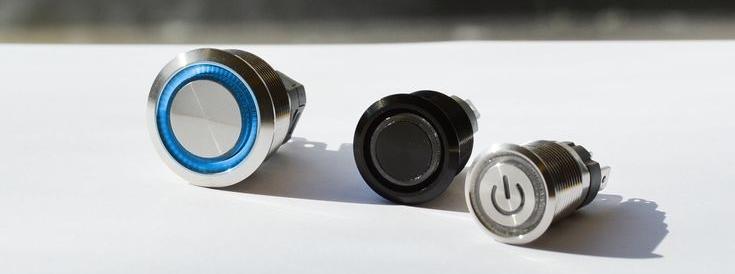
New_category: News

News

  • How to Fix Mini Push Button Switch With Ease

    How to Fix Mini Push Button Switch With Ease

    [vc_row][vc_column][vc_column_text css=””]


    In the world of electronic devices, a mini push button switch can often be a small yet crucial component that facilitates functionality. If you’re experiencing issues with such a switch — perhaps it feels stuck or doesn’t respond as it should — fixing it might seem daunting. However, with a little patience and the right approach, you can address the problem effectively. First, it’s essential to examine the switch for any visible signs of damage or dirt. Sometimes, a small buildup of dust or grime can prevent the push button from making a solid connection. A gentle cleaning using a soft brush or compressed air can often restore its performance.

    If the switch still doesn’t function properly, the next step involves deeper inspection. This could mean prying open the casing carefully to check for any loose connections or internal wear. A multimeter can be handy here to test for continuity, ensuring that the circuit is intact when the button is pressed. If internal components are damaged, it may be more effective to replace the switch altogether. Finding a suitable replacement button involves matching the specifications of the original model, which can often be done by checking the device’s manual or a quick online search. Remember, while it can feel frustrating, taking your time with repairs is key. In doing so, you not only revive your device but also gain a better understanding of its inner workings—who knew fixing a little button could empower you like this?


    Understanding Your Mini Push Button Switch Failure

    When a mini push button switch fails, it can throw off your equipment’s operation in a snap. Manufacturers like Langir know that these little switches are small heroes inside devices—from keyboards to industrial controls. Troubleshooting starts by noting the symptoms: no click, intermittent actuation, or a loose feel. If problems continue, it’s a good idea to contact Langir for expert advice. Common button failure might stem from debris build-up, worn contacts, or solder issues on the printed circuit board.

    Understanding Your Mini Push Button Switch Failure

    Contact Langir for Custom Mini Push Button Switches


    Identifying Common Mini Push Button Switch Problems

    The most frequent issues include the switch not registering a press or having a sticky actuator. These symptoms indicate corrosion or dirt-caused misalignment inside the switch, disrupting its signal. Consistent failure during operation points to a wear-out mechanism that needs repair or replacement.


    Symptoms of a Faulty Small Push Button Mechanism

    A faulty switch can show signs like no audible click, a noticeably soft feel, or even no response to a press. This is often due to broken internal contacts or an accumulation of dust interfering with the mechanical movement.


    Tools Needed for Mini Push Button Switch Repair

    To fix the switch, gather a small soldering iron, flux, a multimeter for testing continuity, precision screwdrivers, and cleaning tools. These items help remove solder bridges, clean the contacts, and resecure loose wires.


    Safety Precautions Before Starting Mini Push Button Switch Troubleshooting

    Before diving into repairs, disconnect the power supply, wear safety goggles, and work on a static-free surface. This minimizes risk of electric shock and damage to sensitive components.


    Mini Push Button Switch Troubleshooting Steps

    Correct troubleshooting proceeds in a logical order. Begin with a visual inspection for visible wear or loose solder joints. Then, check connections with a multimeter for continuity to ensure the button properly closes the electrical circuit.

    Mini Push Button Switch Troubleshooting Steps

    Contact Langir for Custom Mini Push Button Switches


    Performing a Visual Inspection of the Mini Push Button Switch

    Examine the switch for cracked plastic or burnt areas that could point to a failure from overload. A careful look often reveals debris or misaligned parts that require cleaning.


    Checking for Loose Connections to the Mini Push Button Switch

    Over time, connections can loosen due to vibration or repeated use. Gently tug on soldered joints to see if any wires have come off, and re-solder if necessary to restore full connectivity.


    Testing the Mini Push Button Switch With a Multimeter

    Hold the multimeter probes to the contact points of the switch. A healthy switch should show zero resistance when pressed and an open circuit when released. Consistent readings will confirm that the push mechanism is intact.


    Cleaning External Debris Affecting the Mini Push Button Switch

    Dust and debris can stick between the actuator and the contacts. Use a small brush or canned air to clear away particles. This simple step can often restore normal operation.


    Common Mini Push Button Switch Issues

    Understanding common issues helps in both troubleshooting and repair. Often, problems like intermittent actuation occur because the button’s contacts aren’t engaging properly. Other issues include a stuck actuator or a button that feels too loose—signals that the internal mechanisms are misaligned.

    Common Mini Push Button Switch Issues

    Contact Langir for Custom Mini Push Button Switches


    Rectifying a Stuck Mini Push Button Switch Actuator

    If the button is jammed, gently work it back and forth to free any blockage. Sometimes a light application of isopropyl alcohol and a soft brush can clear sticky residues.


    Solutions for an Intermittently Working Mini Push Button Switch

    An intermittent response often suggests poor solder joints or oxidation on the contacts. Cleaning the contacts with a specialized contact cleaner, followed by a careful solder touch-up, may provide a long-term fix.


    Repairing a Mini Push Button Switch That Does Not Click

    A missing click sound means the mechanical feedback is lost. Check the internal spring and actuator alignment. Replacing or realigning these components can bring back that satisfying snap.


    What to Do When a Mini Push Button Switch Feels Loose

    A loose-feeling switch indicates that the housing or the internal clip has become worn. Tighten any visible screws or use a spot of adhesive designed for electronics to secure the button in place.


    Advanced Mini Push Button Switch Repair Techniques

    For those with a bit of technical confidence, advanced repairs might involve opening up the switch to clean inside normally inaccessible areas. Taking apart the casing may reveal microscopic debris or oxidized contacts that a simple cleaning can fix.

    Advanced Mini Push Button Switch Repair Techniques

    Contact Langir for Custom Mini Push Button Switches


    Disassembling the Mini Push Button Switch Casing

    Carefully use precision screwdrivers to remove the casing without damaging the button’s small parts. Lay out the parts in order to reassemble later.


    Cleaning Internal Components of the Mini Push Button Switch

    Inside the switch, delicate cleaning with isopropyl alcohol and a fine brush can remove deep-seated dirt. Make sure each part is fully dry before reassembly.


    Inspecting and Realigning Mini Push Button Switch Contacts

    Examine the tiny metal contacts for wear. If they seem misaligned, use a pair of tweezers to adjust them gently. Proper contact alignment ensures strong conductivity.


    Soldering and Desoldering Wires From a Mini Push Button Switch

    If connections have deteriorated, carefully desolder and reflow the joints. Use quality solder and flux to create a secure bond, ensuring the signal pathway is restored.


    Testing Your Repaired Mini Push Button Switch

    Once repaired, it’s crucial to test the switch both electrically and mechanically. This confirms that the solution works before reopening the device housing.


    Verifying Electrical Continuity Post Mini Push Button Switch Fix

    Use a multimeter again to ensure the repaired switch conducts properly under pressure. A reliable reading indicates that the repair was a success.


    Ensuring Smooth Mechanical Operation of the Mini Push Button Switch

    Press the button repeatedly to check for consistent feedback and action. There should be no irregular sticking or unexpected looseness.


    Reassembling the Device Housing the Mini Push Button Switch

    After testing, carefully reassemble all parts. Ensure every component snaps into place securely to avoid future failures.


    Final Functional Test of the Mini Push Button Switch in Its Application

    Finally, power up the equipment and observe the switch in action during normal operation. This confirms that the repair process has fully restored functionality.


    When to Replace Your Mini Push Button Switch

    Sometimes repairs just aren’t enough, and replacing the switch is the wisest choice. Recognizing when damage is beyond repair saves time and prevents further issues down the road.

    When to Replace Your Mini Push Button Switch

    Contact Langir for Custom Mini Push Button Switches


    Recognizing Irreparable Damage to a Mini Push Button Switch

    If the switch’s internal components are too corroded, or if repeated repair attempts fail to produce consistent action, it’s time for a new one. Look for extensive physical wear or broken parts as clear indicators.


    Selecting a Compatible Replacement Mini Push Button Switch

    Choose a switch that matches the original specifications in terms of voltage, size, and force requirements. Using the right replacement maintains system integrity.


    Steps for Installing a New Mini Push Button Switch

    Remove the damaged switch carefully and solder in the new unit with proper alignment. Always follow manufacturer guidelines for installation to ensure lasting performance.


    Proper Disposal of an Old Mini Push Button Switch

    Dispose of faulty switches through electronic waste programs. This responsible method helps protect the environment from hazardous materials.


    Issue Type Likely Cause Repair Method
    No Click/Sound Worn contacts or debris Clean contacts and re-solder
    Intermittent Action Loose connections or oxidation Reflow joints and clean surfaces
    Loose Actuator Worn internal clip Tighten components or replace

    This table offers a quick reference to common issues, their causes, and recommended repair steps, ensuring you have a handy checklist during troubleshooting.


    • Troubleshooting Checklist:
    • Inspect visually and clean any debris.
    • Test continuity with a multimeter.
    • Re-solder if poor connections are detected.

    By following these steps and tips, Langir ensures you get the most out of your mini push button switches, keeping your equipment running smoothly without unnecessary downtime.


    [/vc_column_text][/vc_column][/vc_row][vc_row][vc_column][vc_zigzag]

    Get Custom Quote
    We’ll get back to you within 12 hours.
    Drag & Drop Files, Choose Files to Upload You can upload up to 3 files.
    [/vc_column][/vc_row][vc_row][vc_column][vc_zigzag][/vc_column][/vc_row]

  • How Does a Mini Push Button Switch Work

    How Does a Mini Push Button Switch Work

    [vc_row][vc_column][vc_column_text css=””]

    Mini push button switches are small, robust components used in everything from consumer electronics to industrial control panels, and they are often available through mini push button wholesale. They control the flow of electrical current by opening or closing a circuit when pressed. Langir, a reputable manufacturer with 16 years of experience in piezo switches, offers these reliable devices with low MOQ and fast turnaround times – for further inquiries, contact Langir. Designed for durability, mini push button switches are engineered to handle various levels of voltage and current while ensuring a stable and efficient operation. Now, let’s dig into exactly how these little switches work and what makes them such a vital part of modern electronics.


    The Core Mini Push Button Mechanism

    The basic mechanism of a mini push button switch starts with a physical press. When the external button or plunger is pressed, it triggers an internal force that moves the actuator. The primary action involves a spring that pushes back once released, ensuring the switch returns to its original state. This spring action is crucial because it guarantees that the electrical circuit is only completed while the button is actively pressed. Once the pressure is released, the spring’s restoring force quickly disengages the contacts, breaking the circuit and stopping the current flow.


    The Core Mini Push Button Mechanism

    Contact Langir for Custom Mini Push Button Switches


    The Role of an Actuator in a Mini Push Button Switch

    The actuator is the central component that translates physical pressure into electrical action. When the button is pressed, the actuator moves downwards, bringing the contacts closer together. This movement ensures that, for a moment, the device mimics a closing circuit. The precision in this motion is essential, as it determines both the speed and reliability of the switch operation.


    Internal Spring Action for Contact Engagement and Disengagement

    Given that timing is critical, the internal spring in these switches must have the perfect balance of tension and resilience. The spring compresses when the button is pressed and then expands rapidly when released. This action not only returns the button to its resting state but also prevents any unintended multiple contacts, ensuring a single, clean connection with each press.


    Fixed and Moving Contacts Interaction Within the Switch

    Inside the switch, there are fixed contacts and moving contacts. The moving contact, propelled by the actuator, aligns with the fixed contact to complete the circuit. When the connection is made, electricity flows through the switch. The design ensures that the contacts engage firmly, reducing resistance and preventing signal loss. This reliable connection is paramount in applications like automation and control systems where precision is key.


    Completing and Breaking the Electrical Circuit

    The mini push button switch serves two primary functions: it completes the circuit when depressed and breaks the circuit when released. By connecting and disconnecting the electrical path, the switch controls power to various components. This simple action is central to its role in devices like remote controls, machinery panels, and even Arduino-based projects. Every press sends a signal—power on when pressed, power off when released—making it critical for managing operations in many electronic systems.


    Key Components of a Mini Push Button Switch

    A mini push button switch is built from several critical parts that ensure it operates reliably in various environments. Understanding these components helps users choose the right switch for their needs.


    Key Components of a Mini Push Button Switch

    Contact Langir for Custom Mini Push Button Switches

    The External Button or Plunger

    The external button is the visible part you press. It is often made from durable materials such as stainless steel, aluminum, or high-grade plastic to withstand repeated use. In industrial settings, the button is designed to be resistant to chemicals, abrasion, and heat, ensuring longevity even under harsh conditions.


    The Switch Housing and Its Protective Function

    The switch housing acts as a protective shell around the internal mechanism. It prevents dust, moisture, and vibrations from affecting the delicate internal contacts. A well-designed housing ensures that the switch remains stable in environments ranging from consumer electronic devices to heavy machinery panels.


    Electrical Terminals for Circuit Connection

    At the back of the switch, electrical terminals connect the switch to the external circuit. These terminals, often copper or coated with silver for improved conductivity, allow the switch to communicate with other electrical components. For applications in printed circuit boards (PCBs) or screw terminal setups, these connections are engineered to reduce signal loss and withstand high current levels.


    The Spring Mechanism in Mini Push Button Switches

    This tiny, yet mighty spring ensures proper resetting of the switch. Its precise calibration is vital for both contact engagement and disengagement. In high-frequency switching applications—such as in automation and consumer electronics—it sustains performance by managing the cycle speed and longevity of the switch.


    Different Types of Mini Push Button Switch Operations

    Mini push button switches operate in several modes, depending on the application’s requirements. Their design can be customized to fulfill specific electrical and mechanical needs.


    Different Types of Mini Push Button Switch Operations

    Contact Langir for Custom Mini Push Button Switches


    Momentary Action in Mini Push Button Switches

    In momentary action switches, the circuit is completed only during the time the button is pressed. Once the pressure is released, the circuit opens immediately. This is common in devices like doorbells or calculators, where a temporary response is needed.


    Latching (Maintained) Action in Mini Push Button Switches

    Latching switches retain their state until they are pressed again. This type is useful in situations where a device should remain on or off without continuously holding the button. For example, some power supply interfaces use latching mechanisms to reduce the need for continuous engagement.


    Normally Open (NO) Mini Push Button Switch Functionality

    Normally open switches show an open circuit by default. They only close when the button is pressed, allowing current to flow. This setup is particularly useful in safety applications, ensuring that accidental activation does not inadvertently complete the circuit.


    Normally Closed (NC) Mini Push Button Switch Functionality

    Conversely, normally closed switches maintain a closed circuit until the button is pressed. This operational type is common in emergency stop mechanisms, where the interruption of the circuit triggers a safety shutdown.


    Single Pole Single Throw (SPST) Mini Push Button Configuration

    The SPST configuration is one of the simplest designs, featuring a single input and output. It is ideal for straightforward applications where only one connection needs to be managed. The ease of integration with systems like PCB assemblies makes it popular in both consumer and industrial markets.


    The Electrical Principles Behind Mini Push Button Switch Function

    At the heart of a mini push button switch lies fundamental electrical theory. These switches control the flow of current and voltage across a circuit, and their performance is largely defined by the materials and design choices made during construction.


    The Electrical Principles Behind Mini Push Button Switch Function

    Contact Langir for Custom Mini Push Button Switches


    How a Mini Push Button Switch Controls Current Flow

    When the switch is activated, the closing of contacts allows current to flow through the device, powering connected components. This direct, low-resistance pathway ensures efficient energy transfer. When deactivated, the separation of contacts interrupts the circuit, cutting off current flow and ensuring no residual current remains.


    Voltage and Current Ratings for Mini Push Button Switches

    Each switch comes with specific voltage and current ratings, which indicate the maximum levels it can handle safely. These ratings are crucial for applications in automation and electronics; selecting a switch with appropriate ratings prevents overheating and ensures reliable performance even under high signal loads.


    Understanding Circuit States: Open and Closed

    A circuit in an open state means there is no continuous path for current to flow, whereas a closed circuit has a complete path. Mini push button switches are designed to alternate between these two states seamlessly. This rapid state change is fundamental to their function in control systems, providing precise management of electrical devices.


    The Significance of Contact Material in a Mini Push Button Switch

    The choice of contact material—be it brass, copper, silver, or stainless steel—affects the switch’s lifespan and reliability. High-quality materials reduce wear and resist corrosion, which is vital in both consumer electronics and industrial applications. Proper selection ensures consistent performance and minimizes maintenance requirements.


    Common Applications of Mini Push Button Switch Technology

    Mini push button switches are found in a myriad of applications across multiple industries. Their small size, durability, and reliable performance make them indispensable components in modern design.


    Mini Push Button Switches in Consumer Electronics

    These switches are used in remote controls, keyboards, game controllers, and other devices where fast, precise input is required. Their compact design and tactile feedback make them ideal for everyday consumer applications.


    Industrial Control Panels Utilizing Mini Push Button Switches

    In factories and industrial settings, mini push button switches serve as crucial control elements. They regulate machinery, initiate automated processes, and ensure that safety protocols are quickly enacted in emergency situations.


    Automotive Uses for Mini Push Button Switches

    From dashboard controls to in-car entertainment systems, mini push button switches play a significant role in automotive electronics. Their reliability and robust construction can withstand the vibrations and temperature fluctuations typical in automotive environments.


    The Mini Push Button Switch in Small Appliances and Devices

    Household appliances and portable devices frequently use these switches for user interfaces and control mechanisms. Whether it’s a microwave oven or a small fan, the switch’s simplicity and reliability contribute to efficient operation.


    Maintaining Your Mini Push Button Switch for Optimal Performance

    For reliable performance, regular maintenance of mini push button switches is essential. Over time, even the most robust switches can suffer from wear, dust, or corrosion—especially in demanding industrial environments.


    Maintaining Your Mini Push Button Switch for Optimal Performance

    Contact Langir for Custom Mini Push Button Switches


    Identifying Common Mini Push Button Switch Issues

    Common issues include contact corrosion, sticky or unresponsive buttons, and reduced responsiveness due to accumulated dirt. Visual and functional inspections can help identify these problems early, preventing operational failures in sensitive applications.


    Basic Troubleshooting Steps for a Mini Push Button Switch

    Troubleshooting typically involves checking electrical continuity, cleaning the contacts, and ensuring that the internal spring is not overly fatigued. In some cases, replacing worn components can restore full functionality. Regular testing and preventive measures go a long way in maintaining performance.


    Cleaning and Lubrication of the Mini Push Button Mechanism

    Dust, debris, and oxidation can interfere with the smooth operation of the switch. Using specialized cleaning agents and lubricants designed for electronic components helps ensure that the internal mechanism remains free of residue, promoting longevity and consistent performance.


    When to Consider Replacing a Mini Push Button Switch

    If cleaning and minor repairs do not restore proper function, it may be time to consider a replacement. For critical applications, regular replacement schedules can prevent unexpected failures. Langir’s mini push button switches are designed for durability, but even the best components eventually require updating in high-use environments.


    How Does a Mini Push Button Switch Work | FAQs

    How does a mini push button switch work?
    It works by using a mechanical actuator to connect and disconnect fixed and moving contacts, thus completing or breaking an electrical circuit with each press.

    What materials are typically used for the contacts?
    Common materials include brass, copper, silver, or stainless steel, chosen for their conductivity and durability under repeated use.

    Can these switches handle high voltage?
    Yes, but they come with specific voltage and current ratings. It’s crucial to select a switch that meets your application’s requirements.

    How often should mini push button switches be maintained or replaced?
    Regular inspection and cleaning are recommended; replacement depends on usage frequency and environmental conditions, typically scheduled in industrial applications.

    Are mini push button switches compatible with automation systems?
    Absolutely. They are widely used in automation and control panels thanks to their fast response, reliability, and ease of integration with soldered terminals or screw terminals.


    Final Thoughts

    Mini push button switches are small yet essential components in many electrical systems. They bridge the gap between human interaction and mechanical control, ensuring precise and reliable operation. With careful design and proper maintenance, these switches deliver long-lasting performance in both consumer and industrial applications. Langir’s expertise guarantees dependable solutions tailored for heavy-duty use, making these switches a smart choice for your manufacturing needs.


    [/vc_column_text][/vc_column][/vc_row][vc_row][vc_column][vc_zigzag]

    Get Custom Quote
    We’ll get back to you within 12 hours.
    Drag & Drop Files, Choose Files to Upload You can upload up to 3 files.
    [/vc_column][/vc_row][vc_row][vc_column][vc_zigzag][/vc_column][/vc_row]

  • How to Waterproof a Toggle Switch | Essential Tips

    How to Waterproof a Toggle Switch | Essential Tips

    [vc_row][vc_column][vc_column_text css=””]


    Keep your electrical circuits safe and sound by waterproofing your toggle switch with a reliable waterproof toggle switch wholesale solution. Moisture can cause shorts and failures, so taking the right preventive measures—like opting for certified components—is crucial. For more specialized advice, you can always contact Langir to ensure that you’re getting the proper setup. This guide breaks down exactly how to waterproof a toggle switch while extending its life and ensuring safety in humid or wet environments.


    The Importance of a Waterproof Toggle Switch

    Waterproofing your toggle switch prevents electrical shorts and failures due to moisture. When water seeps into the switch, it can lead to corrosion and poor performance. This is especially important in marine applications or outdoor settings where splashes and rain are common. Protecting the switch not only keeps the circuit breaker and actuator working properly but also extends overall shelf life. In industries where reliable performance is critical, a waterproof toggle switch means less downtime and fewer maintenance calls.


    The Importance of a Waterproof Toggle Switch

    Contact Langir for Custom Waterproof Toggle Switches


    Preventing Electrical Shorts and Failures Due to Moisture

    Moisture is the enemy of electrical components. If water gets inside, it can create a conductive path that shorts out the circuit. This puts both the switch and the entire system at risk. By waterproofing your toggle switch, water droplets and humidity don’t have a chance to interfere. Think of it as putting on a raincoat—water stays out, and everything works as it should.


    Extending the Lifespan of Your Toggle Switch in Wet Environments

    Waterproofing not only stops short circuits but also shelters the delicate internal parts from corrosion. A protected switch lasts longer, meaning fewer replacements and improved reliability. In commercial settings, this reduction in maintenance equals less disruption to power supplies and project timelines.


    Ensuring Safety in Marine, Automotive, and Outdoor Applications

    Whether installed in a boat, car, or outdoor electrical system, a waterproof toggle switch safeguards both functionality and safety. For instance, in marine environments, saltwater can quickly deteriorate unprotected metal contacts. Waterproofing ensures consistent performance and minimizes risks, keeping the switch—and by extension, the entire electrical system—safe for use.


    Selecting an Inherently Waterproof Toggle Switch

    When starting fresh, selecting a toggle switch that’s designed to be waterproof can save a lot of headaches. A switch built from materials like stainless steel or high-grade plastic often comes with inherent resistance to moisture and dust, meaning less extra work for you.

    Selecting an Inherently Waterproof Toggle Switch

    Contact Langir for Custom Waterproof Toggle Switches


    Identifying a Suitable 12 Volt Toggle Switch Waterproof Unit

    Look for switches specifically rated for wet environments. A 12 volt toggle switch with an IP rating (for example, IP67) is designed to resist water and dust. These ratings ensure that even if water is splashed on the unit, it is unlikely to seep in. Such units are perfect for low voltage automotive and industrial applications.


    Choosing a Waterproof Toggle Switch 3 Way for Specific Circuits

    If your circuit requires multiple connections, consider the waterproof toggle switch 3 way option. This option provides protection to all contacts simultaneously. It’s ideal for more complex control systems where ensuring that every terminal is shielded from moisture is critical to overall operation.


    Comparing Ingress Protection (IP) Ratings of Sealed Switches

    When comparing different models, check the IP rating. A higher number means better protection; for instance, an IP68 rating offers complete sealing against dust and water ingress. In short, knowing the rating is like knowing how strong the raincoat is before stepping out in a storm.


    Material Considerations for a Durable Waterproof Toggle Switch

    Materials matter—a switch constructed with tough, corrosion-resistant materials like silicone rubber or stainless steel can provide enhanced durability. Not only do these materials fend off water and dust, but they also help maintain electrical integrity under varying temperatures, vibrations, and harsh conditions.


    Employing a Toggle Switch Rubber Boot for Water Resistance

    A toggle switch rubber boot is an excellent retrofit if you’re not using an inherently waterproof switch. This boot acts as an additional sealing layer, blocking water and dust from reaching sensitive components.

    Employing a Toggle Switch Rubber Boot for Water Resistance

    Contact Langir for Custom Waterproof Toggle Switches


    Selecting the Correct Size Toggle Switch Rubber Boot

    Choosing the right boot is essential. Make sure the boot fits your switch snugly, much like a glove. If it’s too loose, water can still sneak in; too tight, and you risk damage to the switch. Look for boots made of high-quality, flexible silicone that can handle repeated stretching.


    Step-by-Step Fitting of a Toggle Switch Rubber Boot

    First, clean the switch and surrounding area thoroughly. Next, slip the boot over the switch gently, ensuring that all edges are covered. Finally, press firmly around the edges to guarantee a good seal. This process is simple yet effective in providing an extra shield against the elements.


    Ensuring a Snug Fit for Optimal Protection

    A snug fit is critical for sealing out moisture. Test the boot by giving it a gentle tug—if it easily comes off, it might not be doing its job. Consider heat shrink options for extra security around the edges.


    Checking the Integrity of the Rubber Boot Seal

    After installation, inspect the seal. Look for any wrinkles or gaps where water might penetrate. A regular check can prevent future problems and keeps the switch dependable over time.


    Utilizing a Toggle Switch Waterproof Cover for External Shielding

    Another layer of protection is a dedicated waterproof cover. This cover shields the switch externally, ensuring that water splashes or high-pressure sprays don’t reach the sensitive internals.

    Utilizing a Toggle Switch Waterproof Cover for External Shielding

    Contact Langir for Custom Waterproof Toggle Switches


    Different Styles of Toggle Switch Waterproof Cover Options

    There are various cover options available—from rigid plastic enclosures to flexible, snap-on designs. Each style offers its unique advantages. Rigid covers often provide a more robust defense, while flexible covers are easier to install and adjust.


    Attaching a Toggle Switch Waterproof Cover Securely

    Installation is straightforward: align the cover with the switch, press it into place, and ensure the fasteners or clips lock securely. A well-attached cover offers peace of mind during heavy use or extreme weather.


    Benefits of a Dedicated Toggle Switch Waterproof Cover

    Using a waterproof cover provides an extra barrier, making your assembly more resilient. This additional shield is particularly useful in dusty or wet locations. It helps maintain a dry environment around the switch, reducing the risk of electrical faults and corrosion.


    Combining a Cover With Other Waterproofing Methods

    For maximum protection, combine the cover with a rubber boot. This dual approach significantly reduces any chance of moisture intrusion. When both methods work together, your switch is fortified even in the most challenging conditions.


    Methods to Retroactively Waterproof an Existing Toggle Switch

    If you already have a switch in place, retrofitting it with waterproofing measures is possible. Using specialized sealing materials and tools, you can upgrade the resistance of your existing switch to moisture.


    Methods to Retroactively Waterproof an Existing Toggle Switch

    Contact Langir for Custom Waterproof Toggle Switches


    Gathering Appropriate Sealing Materials and Tools

    Before you begin, collect the necessary supplies: marine-grade sealant, silicone caulk, and any heat shrink tubing or adapter boots. Using quality materials ensures a long-lasting seal that can stand up to everyday use.


    Preparing the Switch and Mounting Surface for Sealing

    Clean the switch surface and the mounting area thoroughly with a degreaser. Any dirt or residue can prevent the sealant from properly bonding. A clean surface is essential for an effective waterproofing installation.


    Applying Marine-Grade Sealant Around the Switch Base

    Using a caulk gun, apply a generous bead of marine-grade sealant around the base of the switch. Spread it evenly to cover all gaps. This step prevents water from seeping around the edges, offering a robust barrier against moisture penetration.


    Sealing the Opening Where Wires Enter the Switch Housing

    Finally, focus on the entry points where wires connect to the switch. Apply adhesive-lined heat shrink tubing or liquid electrical tape over these areas. These measures ensure that every potential gap is sealed and water is kept far away from the circuitry.


    Protecting Electrical Connections for a Fully Sealed System

    Even the best waterproof switch is vulnerable if its electrical connections are exposed. Protecting these connections is the final step in creating a fully sealed system.


    Using Waterproof Connectors for Wiring

    Waterproof connectors offer a specialized solution for keeping moisture out. They seal the wiring connections with durable rubber gaskets, providing an extra layer of security. This is especially useful in systems where wires are frequently exposed to water or dust.


    Applying Heat Shrink Tubing With Adhesive Lining to Terminals

    A robust method to secure terminals is heat shrink tubing with adhesive lining. When heated, the tubing shrinks around the connection, and the adhesive inside bonds to create a watertight seal. This technique is highly effective for fine wiring and delicate terminations.


    Coating Connections With Liquid Electrical Tape

    A quick, yet reliable method is liquid electrical tape. Brush it over the connections to create a flexible, waterproof coating. This tape remains elastic and can adapt to slight movements without cracking, ensuring a constant barrier against water intrusion.


    Specific Steps for a 12 Volt Toggle Switch Waterproof Application

    For low voltage systems, like those operating at 12 volts, extra care is needed. Water and low voltage circuits are particularly sensitive, so making sure every component is thoroughly protected is essential for both safety and functionality.

    Specific Steps for a 12 Volt Toggle Switch Waterproof Application

    Contact Langir for Custom Waterproof Toggle Switches


    Ensuring Component Compatibility in 12 Volt Systems

    Verify that all used components, including switches and connectors, are rated for 12 volt systems. Compatibility prevents accidental overload and ensures the entire assembly functions smoothly. Manufacturers often list specific voltage ratings on their products—check these before beginning your installation.


    Shielding Low Voltage Connections From Corrosion

    Low voltage connections are especially prone to corrosion if exposed to moisture. Use anti-corrosion coatings or anodized parts to keep these connections pristine. Such preventive measures prolong the life of the system and maintain reliable performance over time.


    Common Scenarios Requiring a Waterproof 12 Volt Toggle Switch

    Applications like automotive lighting, outdoor signage, and industrial control panels often rely on 12 volt systems. In these scenarios, waterproofing isn’t just a convenience—it’s a requirement. By applying these methods, you ensure that every toggle action is protected, and your power supply remains uninterrupted.


    Addressing the Nuances of Waterproofing a Toggle Switch 3 Way

    Toggle Switch 3 Way systems introduce complexity due to multiple contacts and wiring setups. Waterproofing these switches involves special attention to each terminal and intricate sealing around every connection.


    Protecting All Terminals on a Multi-Connection Switch

    Each terminal in a 3 way switch must be individually sealed. This often requires specialized gaskets or additional heat shrink tubing to ensure that no entry point is left exposed. When every connection is home-to-home sealed, the integrity of the system is maintained even in harsh weather conditions.


    Sealing Strategies for More Complex 3 Way Switch Wiring

    Complex wiring demands comprehensive sealing strategies. Use a combination of waterproof connectors, marine-grade sealants, and adhesive heat shrink to cover every potential gap. Detailed care preserves the functionality of each circuit within a complex switch setup.


    Recommended Sealing Products for a Waterproof Toggle Switch 3 Way

    Experts often recommend a few trusted products: high-quality silicone-based sealant, adhesive-lined heat shrink tubing, and waterproof connectors rated for multi-terminal applications. These products are designed to work together to form a durable, long-term barrier against water and dust.


    Verifying the Effectiveness of Your Waterproofing Efforts

    The final step in any waterproofing project is thorough testing. Ensuring that no moisture has made it past your seals helps confirm that your system is ready for use. A simple test can save expensive repair work down the line.

    Verifying the Effectiveness of Your Waterproofing Efforts

    Contact Langir for Custom Waterproof Toggle Switches


    Performing a Gentle Water Spray Test

    Gently spray water over your switch and observe any moisture penetration. This non-invasive method highlights any weak points in your waterproofing. Even a few stray droplets can indicate the need for further sealing.


    Inspecting for Any Signs of Water Ingress

    Take a close look at all sealing points. Look for discoloration or corrosion around the switch base and wiring connections. If you spot any signs of water ingress, it’s best to reapply sealant immediately.


    Actions to Take if Water Penetration Is Detected

    Should the test reveal any water penetration, address it by removing the affected seal, cleaning the area, and applying a fresh coat of waterproof sealant. Repeat the test until the switch shows no signs of moisture intrusion.


    Maintaining Your Waterproofed Toggle Switch for Longevity

    Regular maintenance keeps your waterproof toggle switch functioning optimally. Over time, seals can wear and material can degrade. Routine inspections and cleaning help preserve the integrity of the waterproof layers.


    Periodic Inspection of Seals and Covers

    Set up a schedule to inspect your switch. Look over the rubber boots, covers, and connections for any signs of wear and tear. Early detection of issues lets you reapply or replace components before failure occurs.


    Cleaning Procedures for the Waterproofed Assembly

    Use a soft, dry cloth to dust off the switch regularly. For a deeper clean, use mild soap and water—but be sure to dry it completely afterward. Keeping the assembly free of debris helps maintain its waterproof qualities.


    Recognizing When to Reapply Sealants or Replace Protective Gear

    If you notice cracks, looseness, or degradation in your seals or covers, it’s time for maintenance. Reapplying marine-grade sealant or replacing a rubber boot can significantly extend the life of your switch. Regular upkeep ensures reliable performance in any environment.


    Protecting Electrical Connections for a Fully Sealed System

    Beyond the switch itself, every connection in your setup must be waterproofed. This final layer of protection is essential for a durable, dependable electrical system that stands up to adverse conditions.


    Contact Langir for Custom Waterproof Toggle Switches

    Contact Langir for Custom Waterproof Toggle Switches


    Using Waterproof Connectors for Wiring

    High-quality waterproof connectors are designed to lock out moisture effectively. They come with rubber gaskets that create a tight seal around the wires. Utilizing these connectors avoids the common pitfalls of exposed wiring and potential short circuits.


    Applying Heat Shrink Tubing With Adhesive Lining to Terminals

    For additional security, cover your terminals with adhesive-lined heat shrink tubing. This method not only holds the connections together but also provides a robust barrier against water ingress. It’s an efficient way to ensure long-term protection.


    Coating Connections With Liquid Electrical Tape

    Liquid electrical tape is another handy option. Brush it over the connections for a flexible, durable, waterproof coating that moves with the wires. This little extra step can make a big difference in maintaining a sealed system.


    [/vc_column_text][/vc_column][/vc_row][vc_row][vc_column][vc_zigzag]

    Get Custom Quote
    We’ll get back to you within 12 hours.
    Drag & Drop Files, Choose Files to Upload You can upload up to 3 files.
    [/vc_column][/vc_row][vc_row][vc_column][vc_zigzag][/vc_column][/vc_row]

  • How to Waterproof Small Push Button Switches

    How to Waterproof Small Push Button Switches

    [vc_row][vc_column][vc_column_text css=””]


    When it comes to waterproofing small push button switches, the process isn’t just crucial for enhancing durability, especially in outdoor or wet environments, but it also allows for a level of assurance that your electronics will function flawlessly, even during a surprise rain shower.


    Moisture Risks for Your Small Push Button Switch

    Small push button switches can be real divas when moisture gets involved. They’re designed for precise operations, but water—humidity, splashes, or condensation—can throw them off balance. Common environmental threats include high humidity, splashing water during cleaning, rain exposure in outdoor applications, and sudden temperature changes that may cause condensation. For additional support and solutions, contact Langir for expert advice on maintaining these sensitive components.


    Moisture Risks for Your Small Push Button Switch

    Contact Langir for Custom Small Push Button Switches


    Common Environmental Threats to Small Switches

    Moisture might sneak in from heavy rains, industrial cleaning processes, or even in a damp workspace. These conditions weaken the switch contacts, cause corrosion, and might even lead to internal short-circuits. Over time, this degrades performance and can lead to unexpected failures.


    Ingress Protection (IP) Ratings for Switches

    Understanding IP ratings is essential. An IP67 rating means the switch is protected from immersion in water up to 1 meter, whereas an IP55 might only resist spit and light jets. Knowing the right rating helps choose a switch that fits your unique environment.


    Required Water Resistance Level for Your Application

    For industrial settings, a higher water resistance—often above IP65—is recommended. Think about applications where splash or condensate is expected; it’s better to be safe than sorry.


    Effects of Water Ingress on a Small Push Button Switch

    Water damage can lead to non-responsive switches, erratic behavior, or permanent corrosion on contacts. Users might experience repetitive malfunction, requiring frequent repairs or replacements—a headache for any manufacturing setup.


    Appropriate Waterproofing Methods for Small Push Button Switches

    There are plenty of options to shield your switches from moisture. Waterproof covers or boots add an extra barrier. Conformal coatings act like a protective film over the circuitry, while potting or encapsulating creates a sealed, resin-filled environment. Pre-sealed components are available off-the-shelf for faster deployment. In some cases, building a custom enclosure might be the best call to guard your delicate switch.


    Appropriate Waterproofing Methods for Small Push Button Switches

    Contact Langir for Custom Small Push Button Switches


    Protective Covers and Boots for Small Push Button Switches

    These are usually made from silicone or other flexible polymers. They slide over the switch and create a physical barrier against splashes. Quality covers should fit snugly to prevent any water droplets from sneaking in.


    Conformal Coatings for Circuit Protection on a Small Switch

    These coatings, often acrylic or polyurethane-based, form a thin, resilient film that protects internal contacts. They’re great for boards already mounted inside enclosures that might still see the occasional spill.


    Potting or Encapsulating Your Small Push Button Switch Assembly

    Using potting compounds seals all internal components. Though it adds weight, it offers superb protection where exposure to harsh conditions is inevitable.


    Pre-Sealed Waterproofing Switch Components

    Choosing components with factory-applied waterproofing can save time. They may come with a warranty, ensuring durability in challenging settings.


    Constructing a Custom Waterproof Enclosure for Your Small Push Button Switch

    Sometimes, off-the-shelf solutions won’t cut it. Custom enclosures let you design a housing tailored to your system’s needs. Use gasket seals and waterproof adhesives to build a reliable barrier.


    Preparing the Small Push Button Switch and Work Area for Waterproofing

    Before waterproofing, the work area and switch must be spotless. Clean the switch thoroughly, removing any oil or residue. Ensure that the environment is dry and the temperature controlled. This way, nothing interferes with adhesives or coatings.


    Preparing the Small Push Button Switch and Work Area for Waterproofing

    Contact Langir for Custom Small Push Button Switches


    Gathering Necessary Tools and Materials for Waterproofing a Switch

    Tools you might need include sealing compounds, waterproof boots, adhesives, and masking tape. Assembling these beforehand saves time and ensures consistency.


    Thoroughly Cleaning the Small Push Button Switch Surface

    Use isopropyl alcohol to wipe down the surfaces. Dirt or oils interfering with the adhesion can spell disaster later.


    Ensuring a Dry and Controlled Setting for Application

    Try to work in a low-humidity room. A controlled environment means the waterproofing compounds cure faster and bond better.


    Masking Sections of the Small Switch Not Requiring Waterproof Treatment

    Cover areas like labels or connectors that don’t need waterproofing to avoid unnecessary complications.


    Step-by-Step Application of Waterproofing Solutions to Your Switch

    The process starts by applying viscosities of waterproof sealant around the switch base. Fit a waterproof boot snugly over the actuator. Use uniform strokes while applying conformal coating for even protection. Follow each product’s curing and drying times religiously. Some users even combine shrink wrap and sealant to achieve a DIY waterproof solution for momentary push switches.


    Step-by-Step Application of Waterproofing Solutions to Your Switch

    Contact Langir for Custom Small Push Button Switches


    Applying Waterproof Sealant Around the Small Push Button Switch Base

    Squeeze the sealant carefully, noticing that every gap is filled. This prevents any moisture from creeping in from the sides.


    Correctly Fitting a Waterproof Boot Over the Push Button Actuator

    Make sure the boot locks in without loose spots. A snug boot equals better protection.


    Techniques for Uniform Conformal Coating Application on a Small Switch

    Use a fine brush or spray to ensure even coverage, then allow it to dry completely.


    Curing Procedures for Various Waterproofing Materials on Switches

    Follow manufacturer guidelines on curing times—a critical step for optimum waterproofing.


    DIY Waterproofing a Momentary Push Switch With Shrink Wrap and Sealant

    Shrink wrap can be a temporary fix. Wrap the switch tightly, add sealant to edges, and let it set for extra protection.


    Verifying the Water Resistance of Your Modified Small Push Button Switch

    After the waterproofing process, testing is vital. Non-destructive water exposure tests let you see if any leaks exist. Inspect the seal integrity with a magnifying glass and check for moisture. Document your procedures and results to improve future waterproofing runs.


    Verifying the Water Resistance of Your Modified Small Push Button Switch

    Contact Langir for Custom Small Push Button Switches


    Performing Non-Destructive Water Exposure Tests on the Waterproofing Switch

    Lightly spray the switch with water and monitor its response. Look for any erratic behavior.


    Checking Seal Integrity Around the Small Push Button Switch

    Run your fingers along the edges. Any gaps could signal weak points.


    Inspecting for Signs of Moisture Ingress After Testing

    After a few hours, if the switch remains dry, it’s a job well done.


    Documenting Your Waterproofing Switch Process and Test Results

    Keep a record of all materials used and test conditions. This helps fine-tune your process over time.


    Long-Term Care and Maintenance for Your Waterproofed Small Push Button Switch

    Even waterproofed switches need some TLC. Regular inspections are a must. Over time, adhesives degrade and seals can show wear. Routine maintenance ensures your switch continues performing optimally. Check the waterproofing material periodically and reapply as necessary to extend its life.


    Long-Term Care and Maintenance for Your Waterproofed Small Push Button Switch

    Contact Langir for Custom Small Push Button Switches


    Establishing Regular Inspection Schedules for the Waterproofing Switch Seal

    Set up a routine—maybe once every few months—to evaluate the integrity of the seals.


    Recognizing Wear and Degradation of Waterproofing Materials on a Small Switch

    Look for discoloration, cracking, or peeling. These are signs it might be time to reapply your waterproofing method.


    Guidelines for Reapplying Waterproof Coatings on Your Push Button Switch

    When you notice wear, clean the switch once more and reapply a thin layer of your chosen waterproofing solution.


    Proper Storage and Operation of the Waterproofed Small Push Button Switch

    Even after waterproofing, avoid operating in extreme conditions. Store in a cool, dry place when not in use to maintain its longevity.


    How to Waterproof Small Push Button Switches | FAQs

    How do I know if my push button switch is adequately waterproofed?

    Test it with a light water exposure, check for any signs of moisture ingress, and inspect the seals closely.

    What tools are essential for waterproofing my switch?

    Essential tools include a quality waterproof sealant, conformal coating, waterproof boots, and proper cleaning supplies like isopropyl alcohol.

    How often should I inspect the waterproof seal on my switch?

    A routine inspection every few months is ideal. Regular checks help catch early signs of wear and ensure your switch maintains its performance.


    [/vc_column_text][/vc_column][/vc_row][vc_row][vc_column][vc_zigzag]

    Get Custom Quote
    We’ll get back to you within 12 hours.
    Drag & Drop Files, Choose Files to Upload You can upload up to 3 files.
    [/vc_column][/vc_row][vc_row][vc_column][vc_zigzag][/vc_column][/vc_row]

  • Connecting an Illuminated Push Button Switch to Flashlight

    Connecting an Illuminated Push Button Switch to Flashlight

    [vc_row][vc_column][vc_column_text css=””]


    This article digs into the compatibility of illuminated push button switches with flashlights. For those interested in illuminated push button switch wholesale options, the discussion offers insights into how these switches function within various lighting systems. It breaks down how these switches function, the basics of flashlight circuits, and what makes these buttons stand apart from standard ones. It then walks through the benefits of tweaking your flashlight with a lighted switch and highlights challenges—like battery life and space issues—that you may face. Finally, it covers the tools and steps needed to safely rewire your flashlight and offers tips on ensuring long-term safety and reliability. For further guidance, you can always contact Langir if you encounter any difficulties.

    Illuminated Push Button Switch and Flashlight Compatibility

    Illuminated Push Button Switch and Flashlight Compatibility

    Contact Langir for Custom Illuminated Push Button Switches


    Illuminated Push Button Switch Functionality

    An illuminated push button switch is designed to light up when activated, making it easier to operate in the dark. Its internal LED illuminates to signal the switch’s status, providing both a functional and aesthetic upgrade for a flashlight. This extra light helps users quickly locate the flashlight in low-visibility conditions.


    Basic Electrical Principles of a Standard Flashlight Circuit

    In a typical flashlight, the circuit connects a rechargeable battery or another power source through the LED emitter. Resistance and current flow are carefully regulated for optimal brightness. Understanding these principles is key when integrating an illuminated switch, since the additional LED needs proper wiring without drawing too much current.


    How an Illuminated Switch Differs From a Standard Flashlight Button

    Unlike standard non-illuminated buttons, the illuminated version has a built-in light that shows whether the circuit is powered. This visual cue can indicate proper functionality or alert the user to a low-battery condition. The added LED makes the operation intuitive during darkness.


    Assessing Power Requirements for an Illuminated Push Button Switch

    The switch must match the flashlight’s power supply. It requires an appropriate voltage and current rating to ensure both the flashlight and the switch LED function safely. Calculations must include the extra power draw from the illumination, ensuring that the battery isn’t overly burdened.


    Initial Feasibility of Integrating an Illuminated Switch Into a Flashlight

    Before modifying a flashlight, it’s important to check if there is enough physical space and if the design supports additional wiring without compromising waterproofing. Initial tests using a breadboard can determine if the integration is feasible without interfering with existing components.


    Advantages of Modifying Your Flashlight With an Illuminated Push Button Switch


    Advantages of Modifying Your Flashlight With an Illuminated Push Button Switch

    Contact Langir for Custom Illuminated Push Button Switches


    Enhanced Visibility for Locating Your Flashlight in Low Light

    The illuminated button makes it easier to find the flashlight even in pitch-dark conditions. Studies show that a glowing indicator can reduce search time significantly during emergencies, improving overall efficiency in low-light scenarios.


    Modern Aesthetic and Improved User Interface for the Flashlight

    A lighted switch adds a modern look while providing practical feedback. Users can tell at a glance if the flashlight is on or off, enhancing the overall interaction and convenience during quick activations in emergencies.


    Potential for Switch to Indicate Flashlight Power Status (On/Off)

    The light not only shows activation but can also signal battery levels or malfunction warnings. An illuminated push button switch may be designed to change brightness or color based on the circuit’s status, adding an extra layer of information at a glance.


    Increased Ease of Use With a Clearly Identifiable Illuminated Button

    A bright, well-placed LED embedded in the button reduces the risk of pressing the wrong control in stressful conditions. This reliability is especially important for industrial or search-and-rescue contexts, where every second counts.


    Potential Challenges and Considerations for Flashlight Modification


    Potential Challenges and Considerations for Flashlight Modification

    Contact Langir for Custom Illuminated Push Button Switches


    Impact of an Illuminated Push Button Switch on Flashlight Battery Life

    Wiring an additional LED can consume extra power, which might shorten battery life if not calculated precisely. Choosing energy-efficient LEDs and adjusting the resistor settings can help balance the power burden.


    Physical Space Constraints Within the Flashlight Housing

    Flashlight interiors are compact. Integrating an extra switch may require creative adjustments or even modifying internal structures. Ensure that every added component fits without obstructing airflow or affecting waterproof seals.


    Ensuring Electrical Compatibility Between the Switch and Flashlight Components

    The new switch must work harmoniously with existing circuit elements. Misalignment in voltage or wiring technique can lead to short circuits or reduced performance. Reviewing manufacturer specifications for both components is essential.


    Maintaining Weather Resistance of the Flashlight Post-Modification

    Modifying the circuit should not compromise the flashlight’s ability to withstand water, dust, or shock. Sealing the modified sections and using appropriate gaskets or adhesive compounds can preserve the device’s rugged nature.


    Complexity of Wiring an Illuminated Push Button Switch Correctly

    While the wiring process can be straightforward, errors may introduce faults. Following a precise wiring diagram is critical, and employing soldering techniques with proper insulation will ensure a robust modification.


    Selecting the Appropriate Illuminated Push Button Switch for Your Flashlight


    Selecting the Appropriate Illuminated Push Button Switch for Your Flashlight

    Contact Langir for Custom Illuminated Push Button Switches


    Matching Switch Voltage and Current Ratings to Your Flashlight’s Power Source

    Choosing the right switch means checking the voltage and current ratings. Ensure that the switch’s specifications align with your flashlight’s battery output, so the extra LED does not overwhelm the circuit.


    Choosing Between Momentary and Latching Illuminated Push Button Types

    Momentary switches require continuous pressure and revert when released, whereas latching switches maintain state until another press. The choice depends on usage—momentary for temporary signaling or latching for a persistent indicator.


    Considering the Size and Mounting Style of the Illuminated Switch

    The switch should be compact enough to fit within the flashlight housing. Its mounting style must allow secure attachment without interfering with other controls. Evaluate dimensions and design compatibility before purchase.


    Selecting LED Color and Brightness for the Illuminated Push Button

    Different LEDs provide varying levels of brightness and hue. Choosing an LED that offers clear visibility in different lighting conditions while conserving power is essential. Select a color that contrasts well with the flashlight body for maximum visibility.


    Identifying an Illuminated Push Button Switch With Suitable Durability for a Flashlight

    Industrial-grade switches are built to withstand shocks, vibrations, and temperature fluctuations. Look for switches with high durability ratings, ensuring they will survive the rigors of field use and extended everyday carry.


    Wiring an Illuminated Push Button Switch Into a Flashlight Circuit


    Wiring an Illuminated Push Button Switch Into a Flashlight Circuit

     Contact Langir for Custom Illuminated Push Button Switches


    Gathering Necessary Tools and Materials for the Flashlight Modification

    Before starting, collect tools like soldering irons, wire cutters, multimeters, and additional wiring. Also, have replacement LEDs, resistors, and proper connectors readily available.


    Safely Disassembling the Flashlight Casing and Accessing Wiring

    Disassembly should be careful to prevent damage. Remove screws gently and note the wiring layout. Documenting steps can help during reassembly, ensuring that no components are misplaced.


    Identifying Positive and Negative Terminals in the Flashlight and on the Switch

    Locate and mark all battery connections. Clear identification helps avoid wiring mistakes. Using a multimeter can confirm terminal polarity before soldering or connecting the push button switch.


    Soldering or Connecting the Illuminated Push Button Switch to the Flashlight Circuit

    Join the switch wires to the designated circuit points. Ensure that the solder joints are robust and insulated, preventing any short circuits. Take time to confirm each connection.


    Testing the Functionality of the Newly Wired Illuminated Switch and Flashlight

    After reassembly, test the switch under various conditions. Verify that the LED lights correctly and that the flashlight turns on and off as intended. This step ensures that the modification meets both performance and safety requirements.


    Safety Measures and Operational Checks for Your Modified Flashlight


    Safety Measures and Operational Checks for Your Modified Flashlight

    Contact Langir for Custom Illuminated Push Button Switches


    Preventing Short Circuits When Wiring the Illuminated Push Button Switch

    Use heat shrink tubing or electrical tape to cover exposed connections. Double-check all solder joints and wiring paths, ensuring no loose wires can cause a short.


    Verifying Secure Connections for the Illuminated Switch and Flashlight Components

    Inspect and test each connection repeatedly. A loose wire or a poorly soldered joint can affect performance. Confirm that all components are firmly attached and undisturbed.


    Testing the Flashlight in Various Conditions After Adding the Illuminated Button

    Operate the flashlight in different scenarios: low-light outdoors, indoors, and potentially wet conditions. This real-world testing is crucial especially in safety-critical environments like search and rescue.


    Long-Term Reliability Concerns for a Flashlight With an Added Illuminated Switch

    Continual use may degrade connections over time. Regular maintenance and periodic checks can mitigate issues, with pre-emptive replacement of wires or connectors if any signs of wear are apparent.


    Troubleshooting Common Issues With an Illuminated Push Button Switch in a Flashlight

    Common issues include a non-illuminating LED, intermittent connections, or reduced battery performance. Troubleshooting should follow logical steps: verify voltage at key points, inspect physically for corrosion or loose joints, and re-solder connections as needed.


    Final Thoughts

    This exploration shows that integrating an illuminated push button switch into a flashlight is both feasible and beneficial. With careful planning, precise wiring, and attention to electrical compatibility, users can enhance both the functionality and usability of their devices. The improved visual cues lead to better performance during emergencies. For industrial and search-and-rescue applications, these modifications provide an edge in usability and reliability.


    Connecting an Illuminated Push Button Switch to Flashlight | FAQs

    Can an illuminated push button switch affect the battery life of my flashlight?

    Yes, the extra LED draw can reduce battery lifespan, but using energy-efficient switches and proper resistors minimizes this effect.

    Is wiring an illuminated switch into a flashlight complex?

    It can be challenging if you don’t follow a detailed wiring diagram. The process involves careful disassembly, identifying wires, soldering, and testing.

    Will the modification compromise the waterproofing of my flashlight?

    If done correctly with proper sealing and use of waterproof adhesives, the modification should not compromise the unit’s weather resistance.

    What tools do I need for this modification?

    Essential tools include a soldering iron, multimeter, wire cutters, and heat shrink tubing. These help ensure precise connections and safety.

    Where can I source durable illuminated push button switches?

    Trusted manufacturers like Langir offer industrial-grade, customizable illuminated switches that meet high durability standards required for rugged use.


    [/vc_column_text][/vc_column][/vc_row][vc_row][vc_column][vc_zigzag]

    Get Custom Quote
    We’ll get back to you within 12 hours.
    Drag & Drop Files, Choose Files to Upload You can upload up to 3 files.
    [/vc_column][/vc_row][vc_row][vc_column][vc_zigzag][/vc_column][/vc_row]

  • How to Wire an Engine Starter Switch | Essential Steps

    How to Wire an Engine Starter Switch | Essential Steps

    [vc_row][vc_column][vc_column_text css=””]


    Wiring an engine starter switch isn’t rocket science—it’s about getting your wires in the right place and ensuring everything is safe. This guide breaks down the process step-by-step, from gathering your tools to troubleshooting common issues. For those looking for more cost-effective options, consider exploring engine starter switch wholesale opportunities to save on parts. Whether you’re a seasoned DIYer or a curious beginner, you’ll pick up some handy tips on protecting your wiring and ensuring your ignition works smoothly. And if you ever hit a snag, don’t hesitate to contact Langir for expert advice. Let’s dive in and get that engine starting the way it should!


    Preparing for Your Car Engine Start Button Installation

    Before you start wiring, grab your tools and get organized. First off, gather the necessary components: a starter switch, wiring, connectors, a relay, and a fuse. Using quality tools like pliers, wire strippers, and a multimeter is essential. Reviewing safety procedures is next on the list—you don’t want any sparks or shocks while working with vehicle electrics. Make sure your workspace is safe and your battery is disconnected if needed.

    Next, identify key wires on your current ignition system. Know which wires bring voltage and which ground the system. Choose a suitable location for your new start engine switch that is comfortable and accessible in the cabin. Finally, take a moment to understand your vehicle’s specific electrical needs, as wiring setups might differ between models. Keep your vehicle’s manual handy for extra clarity.


    Preparing for Your Car Engine Start Button Installation

    Contact Langir for Custom Engine Starter Switches


    Gathering the Necessary Tools and Components

    Ensure you have a starter switch kit, relay, connectors, insulated wires, and basic hand tools. Quality components reduce risks like corrosion or loose connections while keeping your setup neat.


    Reviewing Safety Procedures Before Working With Vehicle Electrics

    Safety first! Always disconnect the battery before touching any wires and read through your vehicle’s electrical schematics.


    Identifying Key Wires in Your Current Ignition System

    Locate the starter solenoid and ignition wires. Use your multimeter to confirm voltage lines before making any cuts or splices.


    Choosing a Suitable Location for Your New Start Engine Switch

    Pick a spot on your dashboard or center console that is both accessible and safe from accidental presses.


    Understanding Your Vehicle’s Specific Electrical Needs

    Consult your manual to ensure the new wiring won’t overload circuits or interfere with existing features. Know the amperage and voltage requirements!


    Creating Your Engine Start Button Wiring Diagram

    Drafting a wiring diagram is like having a treasure map for your engine’s electrical system. Start by sketching a basic diagram that outlines connection points from the battery to your starter relay. Visually mapping these connections helps avoid mistakes later.


    Creating Your Engine Start Button Wiring Diagram

    Contact Langir for Custom Engine Starter Switches


    Sketching a Basic Engine Start Button Wiring Diagram

    Draw a clear schematic detailing each wire’s path from the start button through the fuse box to the starter relay. Use symbols to represent key components for clarity.


    Locating the Starter Solenoid Wire in the Engine Bay

    Identify the starter solenoid wire in the engine bay using your vehicle manual. This wire is critical for initiating the engine’s cranking sequence.


    Determining Power Source and Ground Points

    Select a reliable power source from the ignition circuit and a solid ground point on the chassis. This ensures strong, consistent voltage for starting the engine.


    Incorporating a Relay for Your Start Engine Switch Circuit

    Add a relay to your diagram. The relay protects your low-current switch from the high current needed to crank the engine.


    Planning Wire Routing From Cabin to Engine Bay

    Plan a route that keeps the wires away from moving parts and heat sources. Secure them with clips or cable ties to prevent any accidental wear.


    Installing the Physical Car Engine Start Button

    Time to put your plan into action. Start by disconnecting the vehicle’s battery to work safely. Mount your starter switch securely in the chosen location and run the wires carefully through the firewall to the engine bay.


    Installing the Physical Car Engine Start Button

    Contact Langir for Custom Engine Starter Switches


    Disconnecting the Vehicle’s Battery for Safety

    Always disconnect the battery first to stop accidental shorts during installation.


    Mounting the Start Engine Switch Securely

    Secure the button in a position that’s easy to reach, using any mounting hardware provided.


    Running Wires Through the Firewall to the Engine Bay

    Gently feed the wires through an existing grommet in your firewall. Avoid dragging or bending them sharply.


    Making Secure Connections to the Starter Solenoid

    Connect the wires to the starter solenoid carefully, ensuring that the connection is solid and insulated.


    Connecting to the Ignition Power Source

    Finish by tapping into the ignition power source as per your wiring diagram. Double-check all connections for reliability.


    Finalizing and Securing Your Engine Bay Wiring

    After wiring everything, it’s time to tidy up. Neatly bundle and secure all new wires with zip ties and protective sleeves. Make sure the wires are positioned away from engine heat and any moving parts.


    Finalizing and Securing Your Engine Bay Wiring

    Contact Langir for Custom Engine Starter Switches


    Neatly Bundling and Securing All New Wires

    Use cable ties to keep wires organized and routed along the chassis neatly.


    Protecting Wires From Heat and Abrasion in the Engine Bay

    Wrap wires in heat shrink tubing or use protective sleeves to guard against engine heat and abrasion over time.


    Double-Checking All Terminal Connections for Tightness

    Make sure all connectors are tight and show no signs of corrosion. Loose wiring can lead to intermittent connections.


    Ensuring No Wires Interfere With Moving Engine Parts

    Visually inspect the routing to ensure wires aren’t in the path of belts or rotating pulleys. Secure them out of harm’s way.


    Testing Your New Engine Starter Switch Setup

    Once your wiring is complete, it’s testing time. Reconnect the battery and perform an initial test of your new switch. Listen for smooth engine cranking and check that all related electrical systems function properly.


    Testing Your New Engine Starter Switch Setup

    Contact Langir for Custom Engine Starter Switches


    Reconnecting the Vehicle Battery

    Carefully reconnect the battery and ensure all connections are firm before powering on.


    Performing an Initial Test of the Start Engine Switch

    Press the new starter switch. The engine should crank promptly without any hesitation.


    Verifying Correct Operation of Other Electrical Systems

    Check that other systems, like lights and radios, haven’t been affected by the new wiring.


    Listening for Any Unusual Sounds From the Engine Bay During Start

    Pay attention to any clicking or unusual noise that could indicate a poor connection or relay issue.


    Checking for Any Overheating Wires or Components

    Monitor components briefly for overheating to ensure that the wiring setup is safe and secure.


    Troubleshooting Common Issues With Your Start Engine Switch Wiring

    If things don’t go as planned, troubleshooting is key. If the engine won’t crank, start by rechecking your wiring schematics and ensuring the battery is connected. A clicking sound usually means the relay is engaging but the starter isn’t receiving enough current. If the switch sticks, it might be due to a loose connection or a wiring fault. Finally, review your diagram and verify proper grounding.


    Troubleshooting Common Issues With Your Start Engine Switch Wiring

    Contact Langir for Custom Engine Starter Switches


    What to Do if the Engine Does Not Crank

    Double-check battery connections, relays, and starter solenoid wiring. Ensure that all power sources are correctly hooked up.


    Addressing a Clicking Sound Without Engine Start

    A clicking sound often points to a weak relay or a poor connection. Inspect the relay and confirm that the power supply is consistent.


    Resolving Problems if the Car Engine Start Button Sticks

    If the button sticks, clean the contacts and check wiring insulation. Realign or remount the switch if necessary.


    Reviewing Your Engine Start Button Wiring Diagram for Faults

    Go back to your wiring diagram, comparing each connection with your work. Correct any discrepancies you spot.


    Ensuring Proper Grounding for the Start Engine Switch

    Confirm that all ground connections are solid. A poor grounding can cause intermittent problems and prevent the engine from starting reliably.


    How to Wire an Engine Starter Switch| FAQs

    How do I pick the right relay for my starter switch circuit?

    Choose a relay that matches the amperage and voltage requirements of your vehicle’s starter system. Check the specifications in your vehicle manual to ensure it can handle the load.

    What safety precautions should I take before wiring my starter switch?

    Always disconnect the battery before starting any work. Use insulated tools and refer to your vehicle’s manual to avoid damaging sensitive components.

    How can I protect my wiring from engine heat?

    Use heat shrink tubing or protective sleeves around the wires, and route them away from high-heat areas in the engine bay.

    What could cause a clicking noise instead of a full engine crank?

    A clicking noise often indicates a weak connection or a faulty relay. Inspect your wiring and connectors, and ensure the relay is functioning properly.

    How often should I check my starter wiring connections for corrosion?

    It’s a good idea to inspect your connections at least annually. Regular maintenance helps avoid intermittent faults and ensures long-term reliability.


    [/vc_column_text][/vc_column][/vc_row][vc_row][vc_column][vc_zigzag]

    Get Custom Quote
    We’ll get back to you within 12 hours.
    Drag & Drop Files, Choose Files to Upload You can upload up to 3 files.
    [/vc_column][/vc_row][vc_row][vc_column][vc_zigzag][/vc_column][/vc_row]

  • How to Get the Engine Start Stop Switch to Accessory

    How to Get the Engine Start Stop Switch to Accessory

    [vc_row][vc_column][vc_column_text css=””]


    This article explains how to use your engine start stop switch to set your car into accessory mode. It covers what accessory mode is, its benefits, and steps to activate it without starting the engine. For those interested in engine start stop switch wholesale, langir’s push button switches make the process simple and ensure reliable power for music, navigation, and other in-car systems. For further details, please contact Langir.


    Comprehending Your Car’s Accessory Mode Functionality

    Accessory mode is the state in which some functions—like the radio, power windows, and climate control—receive power without the engine running. This setting allows you to use essential features while keeping fuel consumption low.


    Comprehending Your Car's Accessory Mode Functionality

    Contact Langir for Custom Engine Start Stop Buttons


    Clarifying What Is Accessory Mode for Your Vehicle

    Accessory mode lets your vehicle run non-essential systems. It delivers just enough energy for lights, the infotainment system, and a few other comforts while the engine remains off.


    Recognizing the Advantages of the Engine Accessory Setting

    Using accessory mode can save fuel, prevent unnecessary wear on the engine, and allow you to enjoy the car’s comforts during short stops. It is especially useful for setting up your music video, checking your smart key, or simply enjoying climate control without a full engine start.


    Differentiating Accessory Mode From the Engine on Position

    While engine on means full power and running, accessory mode uses a much lower power level. This mode prevents the engine from warming up and protects vital parts like the oil filter and cylinder head from unnecessary strain.


    Identifying Systems Powered by the Engine Accessory Feature

    Systems such as the radio, dashboard indicators, and sometimes the power steering enjoy power during accessory operation. These features get just enough energy to keep you connected, without engaging high-power components like the fuel pump or alternator.


    Operating Your Vehicle’s Engine Start Stop Button for Accessory Power

    This section covers how to use your engine start stop button to access accessory mode. It’s all about finding and pressing the right button.


    Operating Your Vehicle's Engine Start Stop Button for Accessory Power

    Contact Langir for Custom Engine Start Stop Buttons


    Finding the Push to Start Button for Accessory Activation

    The push to start button is usually near the steering wheel. It might have a symbol that indicates its dual function.


    Standard Procedures for Using the Engine Start Stop Button

    Simply press the start stop button without depressing the brake. This action should trigger accessory mode, powering systems like the radio and dashboard without starting the engine.


    How Different Car Makes Implement Push to Start for Accessory Functions

    Different brands have variations. Some models may require a longer press, while others might need a quick tap. Always refer to your owner’s manual for specifics.


    Activating Accessory Mode Using the Engine Start Stop Switch

    This section explains the direct steps to engage accessory mode without firing up the engine.


    Contact Langir for Custom Engine Start Stop Buttons

    Contact Langir for Custom Engine Start Stop Buttons


    Engaging Accessory Mode Without Igniting the Engine

    Press the start stop button once. The car’s dashboard lights up, and you hear a soft chime, signaling that accessory mode is active.


    Correct Method to Press the Push to Start for Accessory

    A firm press without pressing the brake ensures that the engine does not start. This prevents wear on the engine components like the sensor circuits or oil pump.


    Indicators Showing Your Car Is in Accessory Mode

    Typically, a light or icon on your dashboard indicates accessory mode. You might also see a dimmer display on screens and minimal fan operation.


    Steps for Keyless Go Systems to Reach Accessory Mode

    With keyless systems, the smart key must be inside the vehicle. Press the start button lightly, and the systems come on without the usual engine rumble.


    Managing Your Vehicle’s Power Consumption in Accessory Mode

    Accessory mode draws minimal power, so it’s important to know what features use energy and how to avoid draining the battery.


    Managing Your Vehicle's Power Consumption in Accessory Mode

    Contact Langir for Custom Engine Start Stop Buttons


    Knowing Which Car Features Use Power in Accessory Mode

    Features such as the radio, interior lighting, and climate control draw from accessory mode. Sensors in the engine compartment remain off, keeping the battery safe from undue drain.


    Tips to Prevent Battery Depletion in Accessory Setting


    • Avoid leaving accessory mode on for long periods when the engine is off.
    • Turn off non-essential features like extra lighting.
    • Check your battery condition regularly to ensure it can handle the brief accessory loads.


    Recommended Time Limits for Using Engine Accessory Power

    Limit accessory mode use to 10–15 minutes if the car is not running. This reduces risk of battery drain while still enjoying the comforts briefly.

    Below is a table summarizing power usage in accessory mode:


    Feature Power Consumption Benefit
    Radio/Infotainment Low Continuous sound and news
    Interior Lighting Minimal Enhanced visibility
    Climate Control Moderate Comfortable temperature


    Deactivating Accessory Mode and Powering Down Your Vehicle

    When you’re finished using accessory mode, turn it off properly to save battery life.


    Deactivating Accessory Mode and Powering Down Your Vehicle

    Contact Langir for Custom Engine Start Stop Buttons


    Turning Off Accessory Mode With the Engine Start Stop Button

    Press the button again, or follow your car’s recommended shutdown procedure. Ensure systems like the radio and lights turn off.


    Steps for How to Turn Off Full Accessory Power Active Notifications

    Check that your dashboard shows no icons indicating accessory activity. Wait a few moments for the system to fully power down.


    Verifying All Systems Are Off Post Accessory Mode Use

    Walk around the car and verify that interior lights are off. This ensures the battery is not unnecessarily drained.


    Ensuring Full Accessory Power Active Is No Longer Engaged

    Double-check the central display and listen for any sounds that indicate active systems.


    Addressing Common Issues With the Engine Start Stop Switch and Accessory Mode

    Sometimes, the switch might fail, or accessory mode may shut down too soon.


    Addressing Common Issues With the Engine Start Stop Switch and Accessory Mode

    Contact Langir for Custom Engine Start Stop Buttons


    What to Do When the Engine Start Stop Button Fails to Enter Accessory


    1. Check the battery charge.
    2. Replace the button cover if it’s damaged.
    3. Confirm that the smart key is present.


    Solutions for Accessory Mode Shutting Down Prematurely

    Ensure all connections, like the sensor links to the signal line, are secure. Sometimes a loose electrical signal can disrupt accessory mode.


    Steps to Clear a Persistent Full Accessory Power Active Message

    Reset the system by turning the key off and on again. This clears any glitches in the power module caused by a delayed response.


    Consulting Vehicle Documentation for Push to Start System Specifics

    Always refer to your car manual for model-specific instructions. Each vehicle might have subtle differences in signaling accessory and engine start systems.


    How to Get the Engine Start Stop Switch to Accessory | FAQs

    What is accessory mode?

    Accessory mode powers up select systems like the radio and interior lights without starting the engine, saving fuel and reducing wear on your engine.

    How do I know if my vehicle is in accessory mode?

    Look for corresponding dashboard icons and a dimmer display on your screens. You may also hear a subtle chime when accessory mode is activated.

    What should I do if accessory mode shuts down unexpectedly?

    Verify all connections, reset the system with a quick button press, and check that the battery is fully charged.

    Can accessory mode drain my battery?

    Yes, if left on too long. It’s recommended to use it for no more than 10–15 minutes at a time to prevent battery depletion.

    Are there model-specific variations in activating accessory mode?

    Absolutely. Consult your vehicle’s owner manual for any unique steps or button press durations needed for optimal performance.


    [/vc_column_text][/vc_column][/vc_row][vc_row][vc_column][vc_zigzag]

    Get Custom Quote
    We’ll get back to you within 12 hours.
    Drag & Drop Files, Choose Files to Upload You can upload up to 3 files.
    [/vc_column][/vc_row][vc_row][vc_column][vc_zigzag][/vc_column][/vc_row]

  • How to Start Your Car With an Engine Push Button

    How to Start Your Car With an Engine Push Button

    [vc_row][vc_column][vc_column_text css=””]


    Starting your car with an engine push button takes the stress out of traditional key ignitions. This system blends modern convenience with reliable safety measures. With a push button, you simply press the brake and hit the button, then your engine fires up. Langir offers push button switches that are affordable in bulk for industrial manufacturing, making it ideal for engine push button wholesale orders. These switches make starting your vehicle simple, efficient, and secure—perfect for any car design using gasoline, automatic transmission, or even manual setups. Now, let’s dive into how these systems work and troubleshoot common issues. For more information or assistance, please contact Langir.


    Understanding Your Vehicle’s Start Engine Button System

    Understanding how the engine push button system works is essential. The button acts as a signal send-off, telling the car’s computer to check for specific conditions before the engine starts. One of the first checks is that you must be in park or neutral. Then, the car is ready to verify that the brake is pressed and the smart key is near. This minimizes accidental startups. The system also integrates inputs from the vehicle’s sensors like the gear lever and tire movement monitor to confirm status. Langir’s push button switches ensure these signals are reliable and efficient.


    Understanding Your Vehicle's Start Engine Button System

    Contact Langir for Custom Engine Push Buttons


    Locating the Engine Start Button in Your Car

    The engine start button is typically on the dashboard near the steering wheel. It is designed to be easily visible and reachable, with a robust build to withstand repeated operations. If it ever feels sticky, it might need cleaning—a simple wipe with a soft cloth often does the trick.


    Key Fob Proximity Requirement for Starting Your Car

    A smart key is essential. The vehicle’s system must detect the key fob within range. This step prevents unauthorized access, making sure whoever is starting the car is the owner.


    The Role of the Brake Pedal to Start the Engine

    Before starting, you must firmly press the brake. This safety measure ensures that the car won’t move unintentionally—a critical step many modern systems rely on.


    Different Modes Activated by the Engine Button

    Pressing the button can trigger multiple modes. Sometimes, just a short press puts your car into accessory mode, powering the radio and lights. A longer press might then start the engine. The system differentiates these actions by the duration of your press.


    The Correct Sequence for How to Start a Car With a Push Button

    To start your car correctly with a push button, a specific sequence is required. Following the steps in order prevents errors and protects your vehicle’s electronic systems.


    The Correct Sequence for How to Start a Car With a Push Button

    Contact Langir for Custom Engine Push Buttons


    Ensuring Your Car Is in Park or Neutral

    The car must be in park (for automatics) or neutral (for manuals), ensuring a safe start. This prevents accidental movements that could cause damage or injury.


    Firmly Pressing the Brake Pedal

    Press the brake pedal firmly. This acts both as a safety measure and as a signal to the vehicle’s computer that you are ready to start the engine.


    Pressing the Start Engine Button Once to Ignite

    Now, press the start engine button. A single press should transmit the “start” command to the fuel pump, ignition coil, and transmission computer, igniting the engine.


    Recognizing Successful Engine Ignition Sounds and Indicators

    Listen for the engine’s purr and check your dashboard. Lights indicating key systems should illuminate, confirming that the engine has started correctly.


    What if Your Car Does Not Start Using the Engine Button

    Sometimes, even a well-designed system can face hiccups. If your car won’t start with the push button, there are a few troubleshooting steps you can try.


    What if Your Car Does Not Start Using the Engine Button

    Contact Langir for Custom Engine Push Buttons


    Checking Your Key Fob Battery Life

    One common issue is a weak key fob battery. A low battery might not send a strong enough signal, keeping the engine button inactive.


    How to Start a Car With a Dead Key Fob Battery

    If the key fob battery is dead, many systems allow for a manual override. Check your owner’s manual to see if inserting the key fob into a designated slot will bypass the wireless signal.


    Identifying Signs of a Low Car Battery

    A dim dashboard or slow cranking engine could indicate a low car battery. Regular battery checks help maintain overall start system reliability.


    Specific Procedures for When the Start Engine Button Fails

    In cases where the start engine button remains unresponsive, consult your vehicle manual. It might involve reconnecting the wiring or using a physical key to reset the system for a restart.


    Accessory Mode and Your Start Engine Button

    Accessory mode lets you use your car’s electronics without starting the engine. This mode is handy for listening to music or checking the GPS while parked.


    Accessory Mode and Your Start Engine Button

    Contact Langir for Custom Engine Push Buttons


    Activating Accessory Mode Without Starting the Engine

    Simply press the start button briefly without the brake engaged. This signal instructs the system to power the dashboard and infotainment but not the engine.


    Using Electronics With the Engine Off

    When in accessory mode, your car’s electrical systems, like the radio and climate control, operate independently of the engine. This is useful when you want comfort without fuel consumption.


    How to Turn Off Accessory Mode

    To exit accessory mode, press the start button again or shift the car into park. The system then powers down the accessories to save energy.


    Turning Off Your Car’s Engine Using the Push Button

    Shutting down your car using the push button is as simple as the startup process. Following these steps ensures that your vehicle turns off safely without harming the electronic systems.


    Turning Off Your Car's Engine Using the Push Button

    Contact Langir for Custom Engine Push Buttons


    Standard Procedure to Stop the Engine

    Press the start button while the car is in park or neutral. The system then cuts off the fuel pump and ignition, shutting down the engine.


    Emergency Engine Shutdown With the Start Button

    In an emergency, a long press on the start button might trigger a rapid shutdown. This is a safety feature that quickly stops the engine if something goes wrong.


    Confirming the Engine Is Completely Off

    Ensure that the dashboard lights turn off and the engine stops completely. A clear sound of silence confirms that all systems are inactive.


    Common Issues Encountered With a Start Engine Button

    Even advanced systems can encounter glitches. Here are a few issues and how to solve them.


    Common Issues Encountered With a Start Engine Button

    Contact Langir for Custom Engine Push Buttons


    The Start Engine Button Light Meanings

    Different indicator lights on your push button can signal problems. A steady light might indicate normal operation, while flashing may signal an error.


    Delayed Engine Response After Pressing the Button

    If there is a lag between pressing the button and the engine starting, it might be a sensor delay. Regular maintenance checks can help prevent this.


    The Engine Cranks but Will Not Start

    This might point to fuel or ignition problems. Check for issues with the fuel pump or ignition coil as part of your troubleshooting routine.


    The Start Button Is Unresponsive

    An unresponsive button might indicate electrical issues. In such cases, contacting a professional or referring to your warranty might be necessary.


    Benefits of a Car With an Engine Start Button Feature

    Modern push button start systems deliver numerous benefits. They provide both convenience and efficiency in daily use.


    Benefits of a Car With an Engine Start Button Feature

    Contact Langir for Custom Engine Push Buttons


    Convenience and Ease of Starting Your Car

    Push button systems are designed for quick, one-touch ignition. No fumbling with keys means less stress and faster starts—a real win for busy mornings.


    Security Aspects of Push Button Start Systems

    These systems often integrate smart key technology, reducing the risk of theft. They ensure that only authorized users can start the engine.


    Reduced Wear on Ignition Components

    Using a push button means fewer moving parts compared to traditional key ignitions. This can prolong the lifespan of critical components in your ignition system, cutting down on maintenance over time.


    Maintaining Your Car’s Push Button Start System

    Regular maintenance keeps your push button system in top shape. Cleaning, software updates, and battery checks are key.


    Maintaining Your Car's Push Button Start System

    Contact Langir for Custom Engine Push Buttons


    Regular Checks for Key Fob Functionality

    Ensure the key fob is working properly. Replace its battery when needed to maintain a strong wireless signal for proper engine start command.


    Keeping the Start Engine Button Clean

    Dirt and residue can impede the button’s function. Periodic cleaning with a soft cloth prevents malfunction and ensures smooth presses.


    Awareness of Software Updates for Your Car’s System

    Manufacturers often release updates to improve starting systems. Keep an eye on these updates to boost performance and security.


    How to Start a Car in Special Conditions With an Engine Button

    Special conditions require specific procedures to use your push button start system effectively.


    How to Start a Car in Special Conditions With an Engine Button

    Contact Langir for Custom Engine Push Buttons


    Cold Weather Starting Procedures for Push Button Cars

    In cold weather, battery performance can dip. Warming the car or ensuring the battery is in good condition helps prevent startup delays.


    Starting the Car After a Long Period of Inactivity

    For vehicles not used for extended periods, check the battery and key fob signal before attempting to start. This pre-check helps avoid unexpected problems.


    Jump Starting a Car That Has a Start Engine Button

    Jump starting remains similar to traditional cars. Use jumper cables correctly and follow safety precautions to recharge the battery and restore push button functionality.


    Push Button Start vs. Traditional Key Ignition

    Comparing push button systems with traditional key ignitions shows several advantages. Push buttons provide enhanced security, ease of use, and less physical wear on components. For modern vehicles, this means a reliable system that adapts to internal safety protocols.


    Push Button Start vs. Traditional Key Ignition

    Contact Langir for Custom Engine Push Buttons


    Differences in the Process to Start a Car

    Traditional keys require insertion into the ignition; push buttons simply need you to press the brake pedal and button. This modern process reduces steps and speeds up the start.


    Advantages of Modern Start Engine Button Technology

    Push button systems respond faster, support smart key features, provide an indicator light status, and ensure that safety conditions are met before starting. This efficiency is a major selling point for bulk switch purchasers.


    Considerations When Switching From Key to Button Start

    When transitioning your vehicle design or retrofitting an older model, consider compatibility with existing systems. Langir’s push button switches are designed for wide compatibility, minimal adjustments, and robust performance across various vehicles.


    Component Traditional Ignition Push Button Start
    Operation Insert key and turn Press button with safety checks
    Wear and Tear Mechanical wear over time Fewer moving parts, less wear
    Security Vulnerable to lock picking Integrated smart key technology

    The table above summarizes key differences. Push button start offers modern advantages that reduce long-term maintenance and raise security standards.


    How to Start Your Car With an Engine Push Button | FAQs

    Can I start the car without pressing the brake?

    No, the vehicle requires the brake press as a safety check before starting the engine.

    What if the push button does not respond?

    Check your key fob battery and vehicle battery. If issues persist, consult a professional technician.

    How do I know if my engine push button system needs maintenance?

    Look for delayed engine startups, unresponsive buttons, or warning lights on your dashboard. Regular check-ups can prevent these issues.

    Are push button starts safer than traditional keys?

    Yes, they incorporate smart key technology and safeguard against unauthorized use, making them more secure overall.

    Do I need to update the software for my push button system?

    Yes, periodic software updates ensure optimal performance and system security.


    [/vc_column_text][/vc_column][/vc_row][vc_row][vc_column][vc_zigzag]

    Get Custom Quote
    We’ll get back to you within 12 hours.
    Drag & Drop Files, Choose Files to Upload You can upload up to 3 files.
    [/vc_column][/vc_row][vc_row][vc_column][vc_zigzag][/vc_column][/vc_row]

  • How the Stop Start Switch Works on Small Engines​

    How the Stop Start Switch Works on Small Engines​

    [vc_row][vc_column][vc_column_text css=””]


    In the whimsical world of small engines, the stop start switch often goes unnoticed yet plays a critical role in their operation. This simple component serves as a bridge between the user and the engine itself, allowing for a seamless start and stop experience. Essentially, when an individual flips the switch to “start,” it completes an electrical circuit that ignites the fuel-air mixture, setting the engine into motion. Conversely, when the switch is flipped to “stop,” it interrupts that circuit, effectively shutting down the engine with a satisfying finality. Understanding this balance is key for any small engine enthusiast, as it demystifies a seemingly mundane switch that wields significant power.

    For the uninitiated, the stop start switch can appear as an unassuming button or lever, but its design ensures it is both intuitive and dependable. In many small engines, especially those found in lawn mowers or chainsaws, this switch is engineered for safety; it prevents accidental starts that could lead to mishaps. The clarity of its operation allows users to manage their machines easily, especially in high-stakes scenarios. Whether it’s a leisurely afternoon lawn care session or a more intensive project, knowing how the stop start switch functions empowers users, giving them confidence as they engage with their small engines. It’s not just a function; it’s part of the intimate relationship between a person and their trusty machine.


    Fundamental Operation of a Small Engine Stop Start Switch

    Understanding the fundamental operation of a stop start switch on small engines is key for anyone who deals with engine control. At its core, this switch directs power flow in small engine systems, controlling when the engine stops or starts. For cost-effective replacements, many operators opt for a stop start switch wholesale option available through specialized distributors. Basic operational mechanics include the conversion of electrical signals into actions that either cut off or initiate fuel and spark. When power interruption is needed, the switch disconnects the circuit, preventing engine rotation. Overall, the system ensures that engines like a tractor or lawn mower operate efficiently while also supporting diagnostics and safety protocols. For further assistance, you can always contact Langir for expert guidance.


    Fundamental Operation of a Small Engine Stop Start Switch

    Contact Langir for Custom Engine Stop Start Switch


    Basic Operational Mechanics in Small Engine Systems

    Small engines rely heavily on simple, yet reliable controls. The basic mechanism involves a push button that, when pressed, opens or closes the electrical circuit. This control integrates with components such as the alternator, starter, and ignition coil to manage the engine cycle. In everyday applications—from compressors to chainsaws—the mechanism ensures that power delivery is stable and that the engine starts or stops as needed. Its design minimizes wear and tear on the engine by preventing abrupt startups, thereby enhancing overall durability and fuel efficiency.


    The Stop Start Switch Function in Power Interruption

    The stop start switch plays a critical role when the system needs to halt power delivery. It quickly cuts off fuel, ignites signals, and interrupts the electrical circuit. This rapid power interruption is useful in emergency stops or when performing routine maintenance. In fields like diesel engine operation, the switch prevents unnecessary engine overrun, reducing stress on components like the crankcase and ignition system. By managing power flow smartly, the switch improves safety and protects vital engine parts from damage caused by sudden power surges.


    Distinctions Between Various Switch Types in Small Engines

    Not all stop start switches are created equal. Mechanical switches, for instance, have a simple on/off design, while electronic switches rely on digital signals for more accurate control. Some high-end systems integrate programmable logic controllers (PLCs) for automatic operation, improving overall responsiveness and efficiency. These distinctions affect how engines, such as those in snow blowers or motorcycles, manage start and stop phases. In many cases, opting for an electronic system can lead to better fuel consumption and fewer maintenance issues. Choosing the right type depends on the specific engine application and user needs.


    Manual Operation Versus Auto Start Stop Features

    Manual switches require an operator to physically press the button, making them well-suited for applications where human oversight is preferred. In contrast, auto start stop configurations use sensors to detect operating conditions such as idling or low voltage, and they automatically engage the switch. Both methods have their merits. Manual operation offers simplicity and clear user intent, while auto systems reduce operator workload and can enhance fuel efficiency by managing repetitive tasks. For versatile equipment like lawn mowers or small trucks, the choice between manual and auto operation can significantly impact performance.


    Key Elements in a Small Engine Auto Start Stop Arrangement

    A small engine’s auto start stop arrangement comprises several components working in concert. The primary stop start switch is the central element, usually rooted in digital or analog signal processing. Relays and solenoids work hand in hand with the switch to control large currents using small input signals. Various sensors provide information about engine temperature, voltage levels, and mechanical rotation, which are crucial in triggering the auto start stop function. For example, an alternator may signal the switch to disconnect when high electrical loads are present, thereby protecting the engine and increasing its longevity.


    Key Elements in a Small Engine Auto Start Stop Arrangement

    Contact Langir for Custom Engine Stop Start Switch


    Locating the Primary Stop Start Switch Component

    Locating the primary switch within the engine’s wiring harness is the first step in troubleshooting. Usually mounted on the control panel or near the engine block, this component is critical in sending the right signals to power the engine on or off. Its placement is designed for easy access during maintenance.


    Understanding Relays and Solenoids Within Auto Start Stop Designs

    Relays and solenoids act as intermediaries; they use small electrical currents to trigger larger switches. These components ensure that the engine’s auto start stop feature works correctly by protecting the circuitry and managing current flow.


    How Sensors Activate Auto Start Stop Operations

    Sensors feed real-time data into the system. For instance, low voltage or overheating conditions automatically trigger the switch, ensuring that proper engine parameters are maintained and damage is prevented.


    Power Source Requirements for Auto Start Stop Functionality

    Reliable power inputs from sources like batteries and alternators are essential. Without stable power, the switch might not function accurately—leading to unwanted engine shutdowns or starting issues.


    Control Diagram for Small Engine Applications

    A detailed control diagram shows how electrical paths are configured from the stop start switch through all engine parts. These diagrams use standard symbols to denote components like fuses, relays, and sensors. Engineers rely on these schematics for troubleshooting and ensuring correct wiring. By following the electrical paths laid out in a diagram, technicians can pinpoint faults and rectify issues without dismantling the engine extensively.


    Control Diagram for Small Engine Applications

    Contact Langir for Custom Engine Stop Start Switch


    Standard Symbols Found in a Start Stop Motor Control Diagram

    Symbols represent relays, push buttons, and even ground points. Familiarity with these helps diagnose problems quickly.


    Following Electrical Paths From Switch to Engine Parts

    Technicians trace the circuit from the switch to the ignition system and starter motor, ensuring every connection is sound.


    Pinpointing the Stop Start Switch in a Schematic

    Identifying the switch on the diagram is crucial. This element is typically marked by a simple “ON/OFF” symbol and is central to the entire system.


    Utilizing a Diagram for Auto Start Stop System Checks

    A control diagram is an indispensable tool during inspections. It offers a clear visual of wiring and components, enabling swift identification of malfunctions in the system.


    How to Wire a Start Stop Switch on Your Small Engine

    Wiring a start stop switch involves several safety measures. Always disconnect the battery before beginning any work on the electrical system. With the right tools and supplies—like wire strippers, soldering irons, and appropriate connectors—the process becomes straightforward.


    How to Wire a Start Stop Switch on Your Small Engine

    Contact Langir for Custom Engine Stop Start Switch


    Essential Safety Measures Before Wiring Work

    Safety is paramount. Disconnect power sources, secure all cables, and wear protective gear to reduce the risk of shock or short circuits.


    Necessary Tools and Supplies for Small Engine Switch Installation

    The basic kit should include screwdrivers, pliers, electrical tape, and a multimeter to test voltage levels during installation.


    Connecting a Standard Stop Start Switch Step by Step


    1. Disconnect the battery.
    2. Locate and remove the old switch if present.
    3. Connect the wiring harness to the new switch ensuring correct polarity. Each step requires careful verification to prevent miswiring.


    Wiring Specifics for Auto Start Stop Configurations

    When dealing with auto systems, ensure sensor wires are integrated. Such systems use additional connectors that require exact placement to communicate with the engine control unit.


    Verifying Correct Stop Start Switch Setup

    Once wired, test the circuit with a multimeter. This step confirms that the switch properly interrupts and restores power to engine components.


    Common Faults With a Small Engine Stop Start Switch

    Faults in the switch can lead to inconsistent engine performance. Common issues include loss of power, improper signal transmission, and physical wear signs. Troubleshooting involves checking the wiring diagram, testing the switch using a multimeter, and confirming that sensors are correctly aligned.


    Common Faults With a Small Engine Stop Start Switch

    Contact Langir for Custom Engine Stop Start Switch


    Indicators of a Malfunctioning Stop Start Switch

    Signs include the engine not starting, unexpected shutdowns, or erratic behavior during normal operations.


    Methods for Testing Switch Performance

    Technicians often use digital multimeters and diagnostic tools. These methods verify if the switch is registering the correct voltage and if its response times are within acceptable ranges.


    Resolving Problems in Auto Start Stop Mechanisms

    Solutions range from repairing loose connections to completely replacing the switch if wear is extensive. Regular maintenance can prevent many common faults.


    Deciding Between Repair or Replacement of a Small Engine Switch

    A cost-benefit analysis can help here: minor faults may be repaired, whereas serious damage usually calls for a replacement to ensure reliability.


    Selecting a Suitable Stop Start Switch for a Small Engine

    Choosing the right push button switch depends on engine demands and usage conditions. There are various types available, each with unique advantages that can improve efficiency and durability. The decision may come down to whether the application requires a manual or automatic configuration.


    Selecting a Suitable Stop Start Switch for a Small Engine

    Contact Langir for Custom Engine Stop Start Switch


    Available Varieties of Stop Start Switches for Small Engines

    Consider options like mechanical, electronic, or hybrid switches. Each type offers unique durability and response characteristics suitable for different engines—from gasoline to diesel.


    Aligning Switch Features With Small Engine Demands

    Match the voltage, current rating, and operating temperature range to your engine’s specific needs. Properly rated components ensure long-term performance and safety.


    Factors for Considering an Auto Start Stop System Upgrade

    Upgrades may include advanced sensor integration and digital control, which can significantly enhance reliability and fuel efficiency.


    Finding Reliable Suppliers for Small Engine Stop Start Switches

    Working with trusted manufacturers—like Langir—ensures low MOQs, fast turnaround times, and high-quality products that meet industrial standards. Quality suppliers will offer comprehensive support for troubleshooting and repair.


    How the Stop Start Switch Works on Small Engines | FAQs

    How does a stop start switch affect engine performance?

    It ensures that the engine stops and starts efficiently, reducing wear and enhancing fuel efficiency by controlling power interruption precisely.

    Can I upgrade from a manual to an auto start stop system?

    Yes, upgrading can improve performance by integrating sensors and digital controls, though it may require additional wiring and component compatibility checks.

    What common issues arise with small engine stop start switches?

    Common problems include wiring faults, sensor misalignments, and general wear, all of which can typically be troubleshooted with a multimeter and proper circuit diagrams.


    [/vc_column_text][/vc_column][/vc_row][vc_row][vc_column][vc_zigzag]

    Get Custom Quote
    We’ll get back to you within 12 hours.
    Drag & Drop Files, Choose Files to Upload You can upload up to 3 files.
    [/vc_column][/vc_row][vc_row][vc_column][vc_zigzag][/vc_column][/vc_row]

  • How Do Cars With an Engine Button Work

    How Do Cars With an Engine Button Work

    [vc_row][vc_column][vc_column_text css=””]


    Understanding how cars with an engine button work can be quite the amusing revelation for many, though perhaps not as hilarious as a late-night highway encounter with a raccoon. When a driver pushes that button, it activates a sophisticated system designed for both convenience and security. Instead of inserting a traditional key and turning it, the driver simply presses the button, which triggers a series of electronic signals. These signals communicate with the car’s computer, allowing it to engage the ignition system and start the engine.


    The Basics of Push Button Start Systems

    Cars with push button start systems replace the traditional key insertion method with a streamlined, electronic approach. for more information, please contact Langir. In simple terms, when a driver approaches a keyless car, the system automatically detects the key fob and allows access. The ignition does not require a physical key turning in the lock but a simple press of an engine start button wholesale. This modern setup is designed to simplify the process while maintaining a high level of security.


    The Basics of Push Button Start Systems

    Contact Langir for Custom Engine Push Buttons


    The Role of the Key Fob in Keyless Entry Car Access

    The key fob is essential—it is a small transmitter that communicates with your car. It uses radio frequency signals in a rolling code to prevent hacking. When you approach, the car’s computer verifies the unique code, which means only your keyless fob can grant access. This method minimizes the risk of theft by ensuring that a cloned or intercepted signal won’t unlock your vehicle.


    What Initiates the Car Ignition Sequence

    Starting the car isn’t as mystical as it sounds. When you press the push start button, your car’s electronic control unit (ECU) sends a signal to the starter solenoid. This small, powerful device channels the electrical energy needed to activate the motor. Essentially, the push start button bridges your input and the engine’s mechanical process, turning your car’s ignition into a seamless, digital operation.


    Core Components of a Push Button Engine Start Switch

    Behind the friendly press of the start button lies a network of critical parts: the button itself, wiring, relays, and the ECU. These components work together to ensure a reliable start. The button is often integrated into your dashboard, designed to be both aesthetically pleasing and durable. It connects with a relay that, in turn, sends a clean and controlled burst of power, engaging the starter motor. This system is common on vehicles like the Toyota RAV4 or the Mazda, and is constantly refined by OEMs to improve user experience and efficiency.


    How the System Recognizes an Authorized User

    The system uses sophisticated encryption protocols; when an authorized key fob comes near the car, its signal and rolling code are matched against stored data. If there’s a match, the immobilizer is disabled—this prevents unauthorized engine starts. This security layer combines radio frequency verification with the car’s internal computer algorithms to keep theft at bay and ensure that only the rightful user can operate the vehicle.


    Differences From Traditional Keyed Car Ignition

    Traditional car keys physically turn in the lock and ignition cylinder, making them prone to mechanical wear and potential forced entry. Push button systems eliminate the bulky key, reducing wear on the ignition components. They also bring a cleaner, sleeker interior design look and allow for future integrations with smartphone apps, smart assistance, and even remote-start features.


    The Technology Behind Your Push Button Engine Start Switch

    Modern push button start systems rely on advanced technology to work accurately and securely. At the heart of these systems is Radio-Frequency Identification (RFID) technology, which plays a crucial role in identifying and granting access to the authorized user.


    The Technology Behind Your Push Button Engine Start Switch

    Contact Langir for Custom Engine Push Buttons


    Radio-Frequency Identification (RFID) and Its Function

    RFID technology sends and receives data using electromagnetic fields. The key fob uses RFID to transmit its unique code to the vehicle. This encrypted communication ensures that the signal cannot be easily intercepted or copied by potential thieves. The rolling code mechanism further enhances security by constantly changing the transmitted code.


    The Car’s Computer Verifying the Smart Key

    Once the key fob’s signal reaches the car, the engine control unit (ECU) compares the received code against a secure database within the vehicle’s computer. If there is a match, the car’s systems are activated, allowing the engine to start. This verification almost happens in an instant, creating a smooth and intuitive experience for the driver.


    Disabling the Immobilizer for Engine Activation

    A built-in immobilizer prevents unauthorized engine starts by blocking the fuel system or ignition circuit. With a push button start, the immobilizer is only disabled once the ECU confirms the authenticity of the fob. This two-step process helps ward off potential theft attempts, keeping the vehicle secure.


    Powering the Starter Motor Through the Push Button Start

    After the immobilizer is disengaged, the high-powered starter solenoid is triggered by the push button. This solenoid then enables the starter motor to turn over the engine. It’s like giving your car a gentle nudge to jumpstart the power generation process—all coordinated with precise electronic timing.


    Communication Between the Fob and the Car Ignition System

    Clear and concise communication happens between the key fob and the car’s onboard systems using secure protocols. This digital conversation ensures that the engine will only start when all security checks are passed, minimizing any risk of error or theft.


    Activating Your Car Using the Engine Button

    Entering your vehicle is the first step in a modern keyless entry system. Once inside—thanks to features like automatic door handle unlocking—the driver is ready to start the car. It’s essential to press the brake pedal as a safety measure before pressing the push button start. This requirement not only confirms the driver’s intent but also engages additional safety protocols.


    Contact Langir for Custom Engine Push Buttons

    Contact Langir for Custom Engine Push Buttons


    Entering the Vehicle With Keyless Entry Car Features

    Keyless entry systems allow drivers to simply walk up to the car, and the doors automatically unlock. It’s a smooth process that blends convenience with technology. The system detects the key fob’s proximity, which triggers the door handles to extend, making entry effortless even when your hands are occupied.


    The Brake Pedal Requirement for Starting the Engine

    A major safety feature embedded in push button start systems is the mandatory brake pedal engagement. This ensures that the car cannot start unless the brake is depressed, reducing the likelihood of accidental movement and ensuring that drivers are ready for action. With the brake pressed, the system quickly moves to the next step—the engine ignition process—while keeping everything under tight control.


    Pressing the Push Button Start to Initiate Ignition

    Once the brake is pressed and the car identifies the authorized fob, the final step is a simple press of the push button. This action signals the ECU to kickstart the engine. It’s fast, efficient, and feels incredibly smooth—making every drive feel intuitive and modern.


    What Happens if the Key Fob Battery Is Low

    If the keyless fob’s battery is low, many systems alert the driver with a dashboard warning light. In some designs, the system has a backup process, such as a manual override or a secondary battery. Even if the battery is weak, the encrypted code is still transmitted to allow the car to start, although it might fail if the power is too low. Manufacturers ensure that there are safety nets in place for such scenarios.


    Turning Off the Engine Using the Push Button Start

    When it’s time to turn off the engine, a second press of the start/stop button engages the shutdown process. The system carefully disengages the engine while preserving the vehicle’s settings. This method simplifies the overall driving experience, addressing concerns related to mechanical wear and ensuring that shutting down the vehicle is as simple as starting it.


    Advantages of a Push Button Start in Modern Vehicles

    Push button start systems offer a host of benefits over traditional key systems. First and foremost, they provide unparalleled convenience. No more fumbling for keys—just a smooth press and you’re on your way. Manufacturers, like Langir in the market of high-quality push button switches, address cost-sensitive buyers with low MOQs and customization options tailored to industrial manufacturers.


    Advantages of a Push Button Start in Modern Vehicles

    Contact Langir for Custom Engine Push Buttons


    Convenience Offered by Keyless Entry Car and Start

    These systems simplify the driving process by reducing physical key handling. Instead of worrying about losing your car key, you simply rely on your fob, making daily use smoother and less error-prone. Additionally, the sleek design contributes to a modern dashboard aesthetic that appeals to both consumers and fleet operators.


    Enhanced Security Features Compared to Standard Keys

    Their advanced encryption methods, including rolling codes and RFID, provide robust protection against theft. Since the fob’s signal changes with every interaction, interception is nearly impossible. This added layer of security is especially appreciated in urban settings where theft risks are higher.


    Reduced Wear on Ignition Components

    By eliminating the need for a physical key turn, push button systems reduce mechanical wear on ignition components. This prolonged lifespan of the car’s internal parts helps maintain long-term reliability and minimizes the frequency of costly repairs.


    Streamlined Interior Design Aesthetics

    Without bulky keyholes or traditional ignition setups, designers have more freedom to create ultra-modern, clutter-free dashboards. This streamlined look isn’t just about style—it also supports easier maintenance and improved ergonomics for the driver.


    Integration With Other Smart Car Features

    Push button start systems can be easily integrated with additional smart features such as remote starting, climate control, and even mobile apps for monitoring fuel levels or engine diagnostics. This interconnected network transforms your car into a smart, responsive vehicle that adapts to your lifestyle.

    Below is a table highlighting some benefits and features of push button start systems:


    Feature Benefit Example
    Keyless Entry Enhanced convenience and security Automatic unlock
    RFID Verification Rolling code security prevents theft Anti-hacking design
    Reduced Mechanical Wear Extended lifespan of ignition components Fewer repairs
    Sleek Design Cleaner dashboard aesthetics Modern interiors
    Smart Integration Connects with mobile and smart systems Remote start apps


    Common Questions About Push Button Engine Start Switch Operation

    A common concern is the potential for theft; however, these systems are highly secure due to advanced encryption and rolling codes. If the push button start were to fail, there are built-in manual override options ensuring the driver isn’t stranded.


    Common Questions About Push Button Engine Start Switch Operation

    Contact Langir for Custom Engine Push Buttons


    Can a Car With Push Button Start Be Stolen Easily

    No, cars with push button start systems are hard to steal due to their robust encryption and rolling codes. The digital communication between the fob and the ECU provides multiple layers of protection, making it extremely unlikely for unauthorized users to bypass the security measures.


    What to Do if the Push Button Start Fails

    If the push start button fails, the first step is to check the fob’s battery. If that’s not the issue, follow the manual override procedure provided by the manufacturer. This temporary method lets you start your car until the problem is resolved by professional maintenance.


    How Far Away Does the Key Fob Need to Be

    Typically, the key fob must be within a few feet of the car—usually around 5 to 10 feet—to establish a reliable connection. Being further away might disrupt the transmission, but manufacturers optimize the range to ensure everyday usability.


    Replacing a Lost or Damaged Key Fob

    Should you lose or damage your key fob, contacting your car manufacturer or authorized dealer is essential. They can quickly program and replace your fob, ensuring that your vehicle’s security remains uncompromised, with steps that follow strict security protocols.


    Manual Override Options for a Push Button Start

    In emergencies, most vehicles equipped with a push button start have a manual override. This option involves using a hidden key slot or accessing a backup system provided by the automaker, which allows the car to start even if the fob is not functioning properly.


    The Evolution and Future of Car Ignition Systems

    The evolution of car ignition from mechanical keys to push button systems illustrates significant progress in automotive technology. The shift towards electronic ignition has paved the way for increasingly integrated and smart vehicle systems. These advancements are driven by the need for efficiency, enhanced security, and user-friendly design.


    The Evolution and Future of Car Ignition Systems

    Contact Langir for Custom Engine Push Buttons


    From Mechanical Keys to Electronic Push Button Start

    Early car models relied solely on mechanical keys, which were prone to wear and theft. The advent of push button systems marked a turning point, incorporating digital encryption and sensor technologies that increased reliability and extended the lifespan of vital components.


    Integration of Biometrics With Car Ignition

    Looking forward, biometric systems that use fingerprint or facial recognition are expected to be integrated alongside push button technology. This dual-security approach would offer even higher protection by ensuring the driver’s unique biological data is confirmed before starting the engine.


    Smartphone Applications as Keyless Entry Car Solutions

    Many car manufacturers are now embracing mobile apps that serve as virtual key fobs. Users can unlock, start, and monitor their vehicles directly from their smartphones. This technology not only provides convenience but also opens up possibilities for remote diagnostics and maintenance, enhancing overall user experience.


    Advancements in Push Button Engine Start Switch Reliability

    Ongoing research and improvements in electronics mean that future push button systems will become even more reliable. Innovations such as better battery management, more secure encryption, and faster processing capabilities contribute to a flawless operation every time.


    The Future of Vehicle Access and Starting Mechanisms

    As the automotive industry evolves, we anticipate further integration of push button start systems with autonomous driving features. This integration will create a more interconnected, secure, and user-friendly driving environment. Langir, as an industry expert, continues to push the boundaries by delivering high-quality, customizable push button switches that meet the demands of modern automotive technology.


    How Do Cars With an Engine Button Work | FAQs

    What mechanisms secure push button start systems?

    They use encrypted RFID signals and rolling codes to verify the key fob, ensuring only authorized users can activate the ignition.

    Can low key fob battery affect the engine start?

    Yes, a low battery may reduce signal strength, but most systems provide a backup manual override to start the vehicle.

    How does the brake pedal requirement improve safety?

    It prevents accidental engine starts and ensures the driver is prepared to control the vehicle right from the moment of ignition.

    What happens during the manual override process?

    The manual override allows the car to start using a hidden key slot or backup system, bypassing the electronic fob verification temporarily.

    Are push button systems more secure than traditional keys?

    Absolutely, thanks to advanced encryption, rolling codes, and integrated immobilizers, they offer significantly enhanced security.


    [/vc_column_text][/vc_column][/vc_row][vc_row][vc_column][vc_zigzag]

    Get Custom Quote
    We’ll get back to you within 12 hours.
    Drag & Drop Files, Choose Files to Upload You can upload up to 3 files.
    [/vc_column][/vc_row][vc_row][vc_column][vc_zigzag][/vc_column][/vc_row]

  • How to Turn Off Power in Engine Button Car​

    How to Turn Off Power in Engine Button Car​

    [vc_row][vc_column][vc_column_text css=””]


    When your push start car refuses to shut down, it’s not only frustrating—it can be downright scary. This article explains, step by step, how to properly turn off your engine when your keyless ignition or push button just won’t cooperate. For reliable engine start button wholesale solutions, we cover standard procedures, troubleshooting fixes, and even emergency maneuvers to help you regain control safely. Whether you’re troubleshooting a pesky key fob issue or figuring out why your gear stick might be interfering, we’ve got you covered with clear instructions and handy tips to keep you on track. If these measures don’t resolve the issue, be sure to contact Langir for further assistance.


    The Correct Way to Turn Off Car With Keyless Ignition

    When you try to power down a push start car, there’s a proper sequence to follow. First, ensure that you’re following the standard procedure to stop the engine. This means pressing the engine stop button once and waiting for a clear confirmation that the engine has shut down. Remember, it’s vital to check that your vehicle is in the proper state before you assume the job is done.


    The Correct Way to Turn Off Car With Keyless Ignition

    Contact Langir for Custom Push Start Buttons


    Standard Procedure to Stop the Engine in Your Push Start Car

    Start by pressing the button lightly and holding it until the dashboard indicates the engine has stopped. Many modern vehicles provide an audible or visual cue that confirms the shutdown. This ensures that your car isn’t left in an on-state inadvertently.


    Confirming Your Vehicle Is in Park to Fully Turn Car Off

    Double-check that your gear stick is firmly in park. Some cars require the transmission to be in park before allowing an engine shutdown. Not checking this can mean the car might continue to run, even if the start stop button is pressed.


    Differentiating Between Accessory Mode and Complete Engine Shutdown

    Your vehicle might enter an accessory mode where only some systems remain powered. It’s crucial to recognize this state from a full engine shutdown. Look for indicator lights or messages on your dashboard that help you distinguish between the two.


    How the Push Button System Manages Power to the Engine

    Push button systems are sophisticated. They send signals to the engine control unit to cut off fuel and spark, thus stopping combustion. Understanding that your button controls an intricate network helps you troubleshoot if things go awry.


    Common Reasons Your Push Button Car Won’t Turn Off Completely

    When your car doesn’t turn off, it could be due to several issues. The most common reasons include a faulty key fob, a misbehaving gear shifter, or electrical glitches interfering with the shutdown sequence.


    Common Reasons Your Push Button Car Won't Turn Off Completely

    Contact Langir for Custom Push Start Buttons


    Investigating Key Fob Malfunctions Preventing Shutdown

    Sometimes the key fob might not be communicating properly with the car’s computer. A weak battery or simply poor signal may cause your car to ignore the shutdown command.


    Issues With the Gear Shifter Not Allowing the Car to Turn Off

    If the gear stick isn’t in the proper position—usually park—the car might refuse to shut off as a safety measure. Always ensure your transmission is locked in the correct gear.


    Electrical Problems Interfering With the Engine Stop Sequence

    A short in the wiring or a glitch in the car’s electrical system can prevent the command from reaching the engine. Checking these circuits may be necessary.


    A Defective Engine Start Stop Button as the Cause

    The button itself could be worn out or damaged. If the physical switch isn’t making proper contact, the signal won’t be sent.


    Software or Computer System Errors in Your Push Start Car

    Occasionally, a software bug or outdated firmware can lead to shutdown issues. A trip to your dealer for a system update might solve the issue.


    Immediate Actions When Your Push Start Car Fails to Power Down

    If your car remains on, don’t panic. There are immediate steps you can take. Start with basic troubleshooting techniques before diving into emergency features.


    Immediate Actions When Your Push Start Car Fails to Power Down

    Contact Langir for Custom Push Start Buttons


    Basic Troubleshooting for a Car That Stays On

    Begin by removing and reinserting the smart key if possible. This simple act can sometimes reset the system and let the engine shut down.


    Attempting a Forced Engine Stop Using the Push Button

    If the engine refuses to shut down normally, try holding the start stop button for a few extra seconds. Some systems require a prolonged press to initiate a forced shutdown.


    Checking the Key Fob Battery and Proximity

    Ensure the battery in your key fob is strong and that you’re within the proper range. A weak fob might not communicate your shutdown command effectively.


    Verifying No Obstructions Around the Start Stop Button

    Sometimes dirt or debris can interfere with the button’s functionality. Give it a quick clean to ensure it’s responding as designed.


    Emergency Methods to Stop the Engine When the Button Is Unresponsive

    When standard procedures fail, emergency methods become necessary. These techniques should only be used in urgent situations and with caution.


    Emergency Methods to Stop the Engine When the Button Is Unresponsive

    Contact Langir for Custom Push Start Buttons


    Executing an Emergency Engine Shutdown Sequence

    Some vehicles offer an emergency shutdown procedure in the owner’s manual. Following these precise steps can quickly cut off the engine without causing damage.


    Safely Disconnecting the Battery to Cut Power in Engine Button Car

    As a last resort, disconnect the car battery. This will stop the engine instantly but might reset other systems, so only perform this if you feel confident during an emergency.


    What to Consider Before Forcing Your Car Off

    Before taking drastic measures, consider potential risks such as triggering warning lights or affecting your car’s computer system. Weigh the need for immediate action versus possible long-term impacts.


    Locating Your Vehicle’s Emergency Shutdown Instructions in the Owner’s Manual

    Always refer to your owner’s manual for clear instructions and precautions specific to your car model. Manuals often include emergency procedures designed by the manufacturer.


    Preventing Future Issues With Turning Off Your Push Start Car

    Avoiding shutdown issues means regular maintenance and awareness of warning signs. Keep your ignition system in top shape by following routine checks.


    Routine Maintenance for Your Keyless Ignition System

    Regular diagnostics from a trusted auto mechanic or service center should be part of your maintenance routine. This helps catch issues before they become problematic.


    Recognizing Warning Signs That Your Push Button Car Won’T Turn Off Properly

    Listen for unusual sounds or observe dashboard alerts. Early warning signs, such as erratic instrument behavior, can indicate that your ignition system needs attention.


    Best Practices for Using Your Engine Start Stop Button

    Always press gently and avoid repeated or forceful button presses. Following manufacturer recommendations ensures you get the most reliable performance from your system.


    Seeking Professional Repair When You Cannot Turn Off Your Car

    Sometimes, DIY fixes aren’t enough. Knowing when to call in the experts can save you time, money, and potential damage.


    Seeking Professional Repair When You Cannot Turn Off Your Car

    Contact Langir for Custom Push Start Buttons


    When DIY Fixes for a Car Not Turning Off Are Insufficient

    If you’ve tried basic troubleshooting and the engine still won’t shut down, it’s time to schedule a service appointment. Professional diagnostics can pinpoint underlying electrical or hardware issues.


    Describing the Shutdown Problem to Your Mechanic

    Be clear and detailed with your mechanic. Explain the troubleshooting steps you’ve already taken, the symptoms you observed, and any unusual behaviors from the ignition system. Detailed information helps speed up the repair process.


    Understanding Potential Repair Costs for Ignition System Issues

    While some fixes are minor and low-cost, others might require comprehensive repairs or even software updates. Understanding potential costs ahead of time can prepare you for the investment needed.


    How to Turn Off Power in Engine Button Car | FAQs

    What should I do if my push start car won’t shut off at all?

    Begin with basic troubleshooting by verifying the key fob battery, ensuring your gear is in park, and cleaning any debris around the start stop button. If these steps don’t work, follow your owner’s manual for emergency shutdowns.

    Can a software update fix my shutdown issue?

    Yes, sometimes outdated firmware can cause shutdown problems. A visit to your dealer for a software update might resolve the issue if no hardware faults are detected.

    Is disconnecting the battery safe when the engine won’t turn off?

    Disconnecting the battery is an emergency measure and should be performed cautiously. It immediately cuts power but may reset other systems, so consult your owner’s manual first.

    How often should I have my push start ignition system checked?

    Routine inspections every 12 months or according to your vehicle’s service schedule help catch potential issues early, ensuring reliable operation of your keyless ignition system.

    [/vc_column_text][/vc_column][/vc_row][vc_row][vc_column][vc_zigzag]

    Get Custom Quote
    We’ll get back to you within 12 hours.
    Drag & Drop Files, Choose Files to Upload You can upload up to 3 files.
    [/vc_column][/vc_row][vc_row][vc_column][vc_zigzag][/vc_column][/vc_row]

  • How to Wire a 5 Pin Push Button Switch With LED

    How to Wire a 5 Pin Push Button Switch With LED

    [vc_row][vc_column][vc_column_text css=””]


    Welcome to this hands-on guide on wiring a 5 pin push button switch with LED. This article will walk you through the process—from identifying pins to testing your installation. For anyone working in industrial manufacturing, langir’s reliable push button switches, available as push button switch wholesale, offer customization and bulk purchasing at low MOQs. With a friendly, no-nonsense approach, we’ll break down each step so you feel confident in setting up your switch wiring system. Let’s dive in, get your LED lit up, and if you need any further assistance, contact Langir for more personalized support!

    5 Pin Push Button Switch With LED


    5 Pin Push Button Switch With LED

    Contact Langir for Custom Push Button Switches 


    Identifying Each Pin on Your Metal Power Button

    Start by getting familiar with your switch. Each pin on a 5 pin push button switch serves a unique purpose. One pin typically connects to the power source, while another goes to the LED positive connection. The remaining pins handle load, grounding, or signal feedback. When working with metal power buttons, check if the body of the switch is connected to ground. This ensures safe operation and minimizes interference. Mark your pins based on manufacturer diagrams for accuracy, as misidentifying a pin can lead to wiring errors or device failure.


    Common Types of 5 Pin Push Button LED Switches

    Different models of 5 pin switches exist. Some are designed with a permanently illuminated LED, while others only light when the button is pressed. Also, there are variants built in corrosion-resistant materials like aluminium or brass. You might find switches that support three-way functions for complex automation setups. No matter the model, verify that the switch meets national electrical code standards and is tested for durability. Consider factors like the volt rating, insulation quality, and ease of connection with screw terminals for a secure fit.


    Essential Tools and Materials for Switch and Wiring

    Before starting, assemble essential tools: a screwdriver, wire stripper, multimeter, soldering iron, and appropriate cables. Materials should include the switch, wires of the proper gauge, connectors, and, if needed, extra resistors to protect your LED from excess voltage. Using quality materials will help prevent problems such as corrosion or overheating. It’s always worth investing in a solid junction box and insulating tape to keep everything neat and safe.


    Safety Precautions Before Starting Your Wiring Project

    Safety first! Always disconnect your power source before handling any wiring. Use an insulated work surface and wear safety glasses. Double-check that the voltage levels are appropriate for the switch and LED to avoid damaging components. Follow local electrical codes, and if you’re ever in doubt, consult a professional electrician. Taking these precautions guarantees not just a successful installation but also your personal safety.


    Reading a Basic 5 Pin Push Button Switch Wiring Diagram

    A wiring diagram is your roadmap to success. Begin by comparing your physical switch to the diagram provided by the manufacturer. Note where the power, load, LED positive, LED negative, and ground pins are placed. A clear diagram helps avoid miswiring errors, ensuring that the LED lights up correctly. Use a multimeter to check continuity as you connect each pin, verifying that every connection aligns with the schematic.


    Preparing for the 5 Pin Switch Wiring Process


    Preparing for the 5 Pin Switch Wiring Process

    Contact Langir for Custom Push Button Switches 


    Selecting the Correct Wire Gauge for Your Application

    Choose wires that can handle the current of your circuit. Generally, a 22 to 18 gauge wire works well for most LED and low-current applications. Thicker wires may be required if your load demands more power. Proper wire gauge selection affects both safety and performance.


    Stripping and Preparing Wires for Connection

    Strip the insulation carefully, leaving enough exposed wire for a good connection but not so much that wires might short. Trim wires to a neat length and twist strands together if using stranded wire. This minimizes the risk of accidental shorts and creates a clean, lasting connection.


    Understanding Your Power Source and Load

    Before wiring, know your circuit’s power requirements. Confirm that your power source—be it a DC supply or battery—matches the LED’s voltage and current ratings. The load may include additional components, so plan accordingly. Having a clear picture ensures compatibility across the board.


    Planning Your 5 Pin Connector Wiring Layout

    Draw a simple schematic of your layout. Arrange the wires from the power source, through the switch, to the load and LED. Label each connection clearly. A planned layout ensures you aren’t scrambling mid-project and helps with troubleshooting later.


    Testing Your Push Button LED Light Functionality Pre-Installation

    Before finalizing everything, test the LED separately with a known good power supply and resistor. Check that it lights up as expected. This step gives you confidence that the LED and switch are fully functional when integrated into the final circuit.


    Step-by-Step 5 Pin Push Button Switch Wiring Diagram Implementation


    Step-by-Step 5 Pin Push Button Switch Wiring Diagram Implementation

    Contact Langir for Custom Push Button Switches 


    Connecting the Power Source to the Switch

    Connect the positive output from your power supply to the pin designated for power. Make sure connections are secure with screw terminals or soldered joints. A clean connection ensures minimal voltage drop and reliable performance over time.


    Wiring the Load to the Switch Output

    The load, which could be a relay or additional LED setup, connects to the switch’s output pin. Ensure that the load’s positive pin matches with the switch’s output. Follow your wiring diagram closely to avoid any misconnection between load and power.


    Integrating the LED Positive Pin Connection

    Wire the LED’s positive line to its associated pin on the switch. This connection lets the LED offer immediate feedback when the button is pressed. If your design requires an always-on indicator, consider a parallel circuit with an additional resistor for current regulation.


    Grounding the LED Negative Pin Correctly

    Proper grounding is crucial. Connect the LED negative pin and any unused ground pins to the common ground. A stable ground prevents stray voltages and ensures the entire circuit operates safely. Confirm that each ground connection is secure, especially in metal switch assemblies.


    Verifying Connections Against Your 5 Pin Switch Wiring Diagram

    With all wires connected, compare your setup against the manufacturer’s diagram. Use a multimeter to check for continuity and correct voltage levels. Verifying connections reduces the risk of failure once power is restored.


    Configuring the Push Button LED Light Illumination


    Configuring the Push Button LED Light Illumination

     Contact Langir for Custom Push Button Switches 


    Wiring for Always-on LED Indication

    If you want the LED to remain lit as an indicator, wire the positive pin to a constant power source with an appropriate resistor. This method provides a visual cue that the circuit is powered at all times. Adjust resistor values based on the LED’s voltage and current ratings.


    Setting Up LED Activation When the Switch Is On

    For a setup where the LED only lights when the button is pressed, wire it so that the LED circuit is completed solely during actuation. This configuration conserves power and clearly shows when the switch is active. It’s ideal for low-power signaling applications.


    Options for Independent LED Control

    Consider using a microcontroller for independent LED control. This enables programmable patterns or dimming effects when the button is pressed. Independent control provides extra flexibility for advanced automation systems.


    Resistor Requirements for LED Protection in 5 Pin Switch Wiring

    Always include a resistor in series with your LED to limit current and prevent burnout. Calculate the resistor value using Ohm’s law based on your supply voltage and LED forward voltage. A precise resistor value helps extend the LED’s lifespan significantly.


    Troubleshooting Common Push Button LED Light Issues

    If your LED isn’t lighting, first check all connections against your wiring diagram. Look for loose connections or misplaced wires. Use the multimeter to rule out power supply problems and verify that the resistor is functioning correctly. Troubleshooting step-by-step saves time and anxiety.


    Advanced Considerations for 5 Pin Connector Wiring and Metal Power Buttons


    Advanced Considerations for 5 Pin Connector Wiring and Metal Power Buttons

    Contact Langir for Custom Push Button Switches 


    Using a 5 Pin Connector for Easier Installation and Removal

    A dedicated 5 pin connector makes installation straightforward. It allows for modular connections and simpler maintenance. Connectors also reduce the risk of accidental disconnections, an essential aspect for demanding industrial environments.


    Waterproofing Your Metal Power Button Installation

    In industrial settings, weatherproofing is key. Use silicone sealants and waterproof housings around the metal power button to protect against moisture. Proper sealing ensures longevity and reliable performance even in harsh conditions.


    Integrating Your 5 Pin Switch With Microcontrollers

    For advanced automation, integrate your switch with a microcontroller. This opens opportunities for programmable functions, detailed logging, and remote control. Many projects benefit from such integration, ensuring precision and repeatability in operations.


    Paralleling Multiple Push Button LED Lights

    When a project requires multiple indicators, paralleling LED circuits can save space and simplify wiring. Ensure that each LED has its own resistor for consistent brightness. Paralleling requires careful planning to avoid overloading the circuit.


    Specifics of a 5 Pin Ignition Switch Wiring Diagram if Applicable

    Some applications might require ignition switch wiring specifics. In these cases, adhere strictly to the manufacturer’s instructions. This ensures safe and efficient operation, particularly in systems like engines or heavy machinery.


    Testing and Finalizing Your 5 Pin Push Button Switch Installation


    Testing and Finalizing Your 5 Pin Push Button Switch Installation

     Contact Langir for Custom Push Button Switches 


    Performing Initial Power-Up Tests Safely

    Before full deployment, conduct a low-voltage power-up test. Check for correct voltage at the LED and switch. Test the push button actuation to see if the LED responds appropriately. This early testing prevents potential damage later.


    Checking Switch Actuation and LED Response

    After powering up, press the switch multiple times to verify consistent response. Look for any delays or weak illumination that could indicate connection issues. A reliable switch should display immediate LED activation and deactivation.


    Securing All Connections and Mounting the Metal Power Button

    Once testing is complete, secure your wiring with cable ties or heat-shrink tubing. Mount the metal power button firmly in its enclosure using appropriate screws. A secure installation protects against vibration and accidental disconnections.


    Final Inspection of Your Switch and Wiring Setup

    Do a final inspection comparing your setup with the wiring diagram. Ensure there’s no stray wiring, and all connections are tight and clean. This last check is essential before the system is fully integrated into your operation.


    Documenting Your 5 Pin Push Button Switch Wiring Diagram for Future Reference

    Keep a detailed record of your wiring layout, including photographs and diagrams. Documentation aids in future troubleshooting or upgrades, ensuring that any technician can understand and work with your installation.


    How to Wire a 5 Pin Push Button Switch With LED | FAQs

    What is the purpose of the 5 pins in the push button switch?

    The five pins serve distinct roles including connecting power, transmitting the load, and controlling the LED. Each pin is mapped based on the manufacturer’s diagram for proper functionality.

    How do I ensure my LED does not burn out?

    Include a resistor in series with the LED calculated using Ohm’s law. This limits current and prevents excessive voltage from damaging the LED.

    What should I do if the LED does not light up at all?

    Double-check all wiring connections and test components with a multimeter. Verify that the power supply is active and that the push button is making full contact when pressed.

    Can I integrate this switch with a microcontroller for additional features?

    Yes, connecting the switch to a microcontroller allows programmable control, enabling features like dimming or customized LED patterns—ideal for automation projects.

    What safety measures should be taken during installation?

    Always disconnect power before starting, use insulated tools, and verify voltage levels with a multimeter. Following proper safety precautions helps prevent shocks and equipment damage.


    [/vc_column_text][/vc_column][/vc_row][vc_row][vc_column][vc_zigzag]

    Get Custom Quote
    We’ll get back to you within 12 hours.
    Drag & Drop Files, Choose Files to Upload You can upload up to 3 files.
    [/vc_column][/vc_row][vc_row][vc_column][vc_zigzag][/vc_column][/vc_row]